Implementing Healthcare UCaaS, Part 3: From Planning to Executing the Plan

By the end of Part 2, the groundwork was in place: requirements finalized, a channel strategy structured, EHR integrations validated, and every workflow exception captured in a gap register. But a foundation alone does not constitute a structure. Blueprints don't answer phones, route consults, or alert a nurse to a critical lab value. Execution is where you find out what it actually does.
Part 3 covers that shift: design hardening into trained behavior, documentation turning into daily habit.
This phase leaves the least room for error. A peer-reviewed study of 3,600+ nurses links insufficient training to higher stress and more errors on the job. A deployment that goes live before staff are ready doesn't get a quiet do-over. People fall back on the workarounds discovery was meant to retire.
.png)
The real test isn't whether the system was configured correctly. It's whether, weeks after go-live, the future-state vision has become the workspace people actually rely on or whether old habits have quietly crept back in.
Phase 3: Executing the Plan
Phase 3 moves through four stages: implementation approach, rollout strategy, specialized training, and go-live execution through hypercare. Each builds on the one before it, because a sound configuration doesn't survive a poorly sequenced rollout, and a well-sequenced rollout doesn't survive undertrained staff.

1. Turning the Plan Into Practice
The Implementation Mindset
It's tempting to treat this phase like a checklist: configure the system, flip the switch, move on. That approach is how good designs turn into failed deployments.
Execution is where every deferred decision from planning comes due.
- The gap register collects first. Any item left open doesn't disappear, it just becomes a rushed call made under deadline pressure.
- The Two-Column Test still applies: what the system does technically is only half the equation. What it does to a clinician twelve hours into a shift is the half that shows up in adoption numbers later.
- This is also where the internal champion's job continues, not ends. Clinical credibility has to move from the planning room to the floor, because that's where staff actually decide, often within their first few shifts, whether the new system is worth adjusting to or worth working around. IT can build a technically correct system and still lose that decision. Holding the line between design intent and deployment reality takes both.
This implementation mindset shapes everything that follows in this section: how rollout strategy gets chosen, how specialized training gets built for clinical realities rather than generic software features, what actually has to happen on go-live day, and why the weeks of hypercare immediately after are often where the deployment is truly won or lost.
2. Rollout Strategy
Choosing How the System Goes Live
Every deployment eventually faces two related decisions:
- Rollout or Cutover: How much of the organization goes live at once.
- Forwarding or Porting: How the phone numbers themselves make the transition.
Neither is a technical afterthought to be handed to the carrier the week of go-live.
Left unplanned, either one can quietly break the care chain — a missed call during transition doesn't just inconvenience a patient, it disrupts a referral partner, delays a callback, or drops a consult that a clinician was counting on, and potentially puts patients at greater risk. These are planning-phase decisions, made deliberately, not go-live-week decisions made by default.
Decision 1: Phased Rollover vs Full Cutover
A phased rollout keeps the legacy system running as a fallback while departments or locations move over in stages. This provides lower go-live pressure, but a longer parallel environment that can extend carrier costs and introduce its own call quality issues along the way.
A full cutover moves everyone at once, eliminating the parallel environment immediately, but if port timelines slip or the new system isn't fully stable, there's no fallback to lean on.
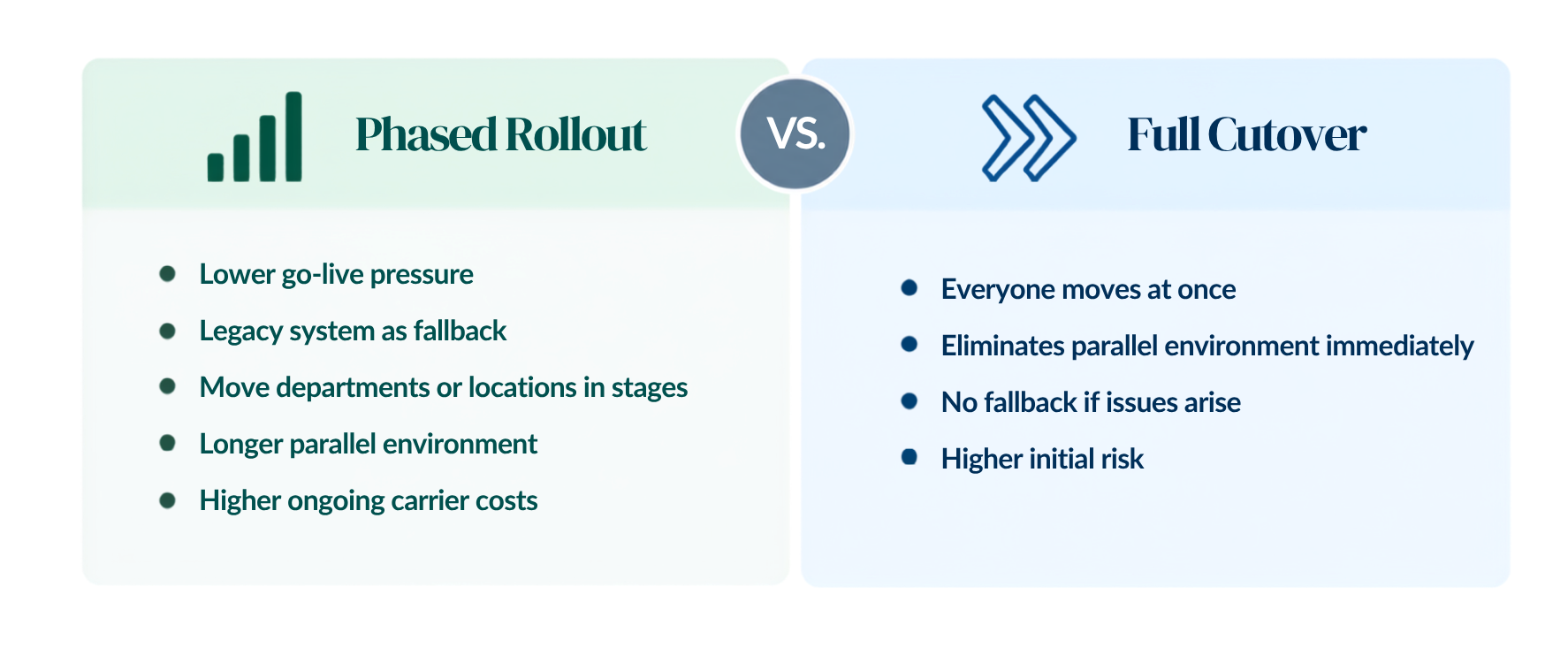
Neither approach is inherently safer; the right choice depends on how much complexity the organization is managing and how much risk it can tolerate. Critical clinical settings environments, where any communication gap has clinical consequences, generally can't afford ambiguity here. The decision needs to be made early, with carrier timelines validated well in advance.
Decision 2: Call Forwarding vs Live Porting
This decision often gets conflated with the first.
With call forwarding, existing numbers stay with the current carrier and forward into the new platform, with the actual port completing later once the system has proven stable. This decouples go-live from the carrier's port timeline and preserves the old system as a safety net, at the potential cost of latency, audio degradation, and dropped transfers during the forwarding period, plus the extended cost of running both environments. These issues are usually identified through intentional testing in advance of the go-live, so the risk is low, but outliers are common.
Live porting skips that layer entirely: numbers move directly to the new platform on go-live day, giving a clean, single-path cutover with no forwarding artifacts. But that cleanliness comes with less margin for error. Port timelines are carrier-controlled and frequently slip, there's no fallback if something breaks on day one, and emergency routing has to be validated before the port completes, not discovered as a gap after. Carrier porting issues are the most frequent source of go-live delay, and they often arrive at the last-minute and without warning.
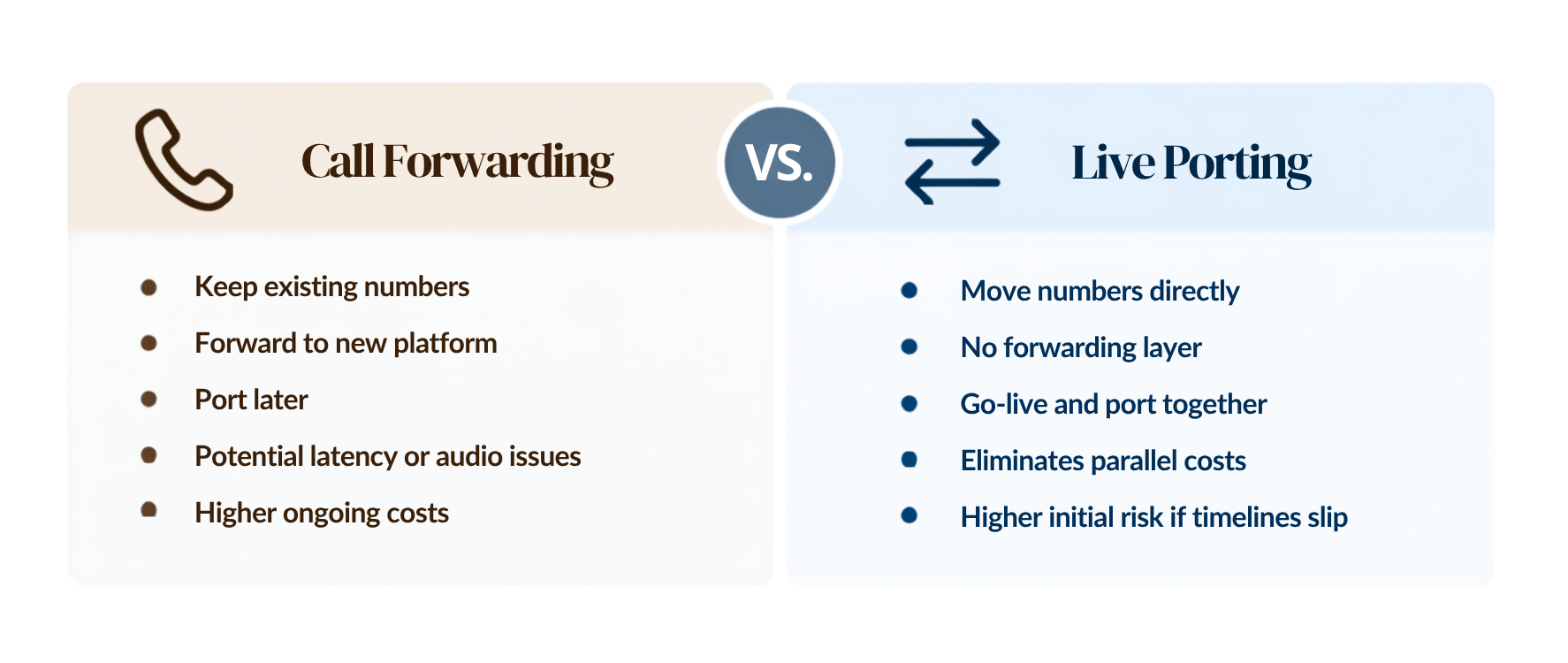
The pattern across both decisions is the same: complexity and risk tolerance should drive the choice, not convenience or a default carrier recommendation.
Organizations with lower complexity and a fully validated pilot, with a firm FOC date in hand, are often well-suited to a live port.
Organizations with higher complexity, tighter clinical continuity requirements, or carrier timelines that can't be pinned down in time are usually better served by forwarding, even with its tradeoffs, than by a hard cutover they haven't fully de-risked.
|
Call Forwarding |
Live Port |
|
Organizations with higher complexity, tighter clinical continuity requirements, or carrier timelines that can't be pinned down in time are usually better served by call forwarding. |
Organizations with lower complexity and a fully validated pilot, with a firm FOC date in hand, are often well-suited to a live port. |
3. Specialized Training
The Most Underestimated Phase of Every UCaaS Deployment
Sequencing gets the platform to the floor. Training is what puts the workflow into the hands of the people running on it, and it's usually the phase scheduled last and funded least.
That order of priorities gets the risk backward. In most industries, a training gap shows up as a productivity dip. In healthcare, it shows up differently: as a missed escalation, a delayed callback, or a nurse who defaults to a workaround because no one showed her what to do when the new system didn't behave the way she expected. Unadopted communication technology in a clinical environment isn't a productivity problem. It's a patient safety problem wearing a productivity problem's clothes.
Most training programs miss this because they're built around the wrong question: They walk staff through every feature, every screen, every setting, instead of the question that actually matters: "What does a clinician need to do in the middle of a twelve-hour shift when an escalation fails and a patient is waiting?” Feature completeness is not the same as workflow readiness, and remote training, however well designed, can't fully substitute for the confusion that only surfaces the moment a system goes live under real conditions. That gap is why on-site presence on go-live day isn't just a nice-to-have. It's where training gets validated and where its gaps get exposed, in real time, with a patient. This is why it’s critical for the training to be constructed from the outside-in view, beginning with the end-users’ frame of mind, and focused on what they’re trying to accomplish rather than what the system can do.
Train to the Workflow
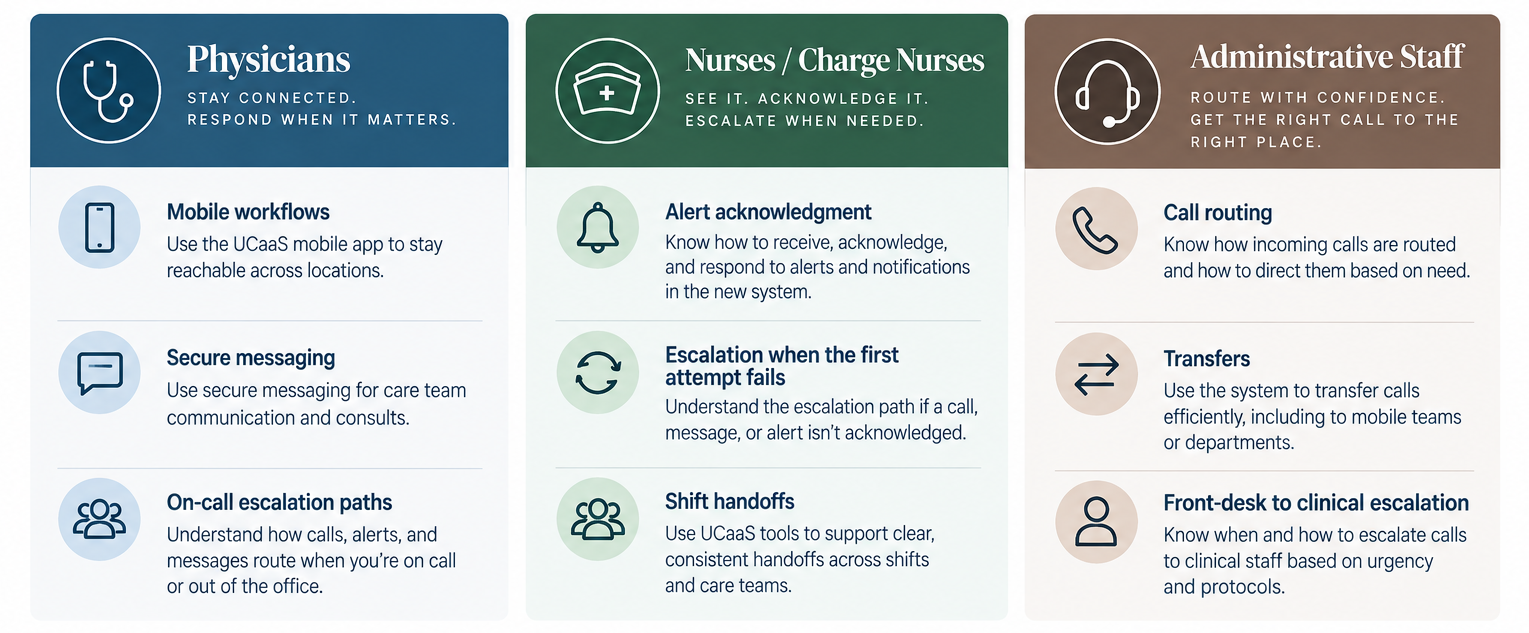
The design principle that follows from this is simple: train to the workflow, not the feature set. A physician doesn't need to know every configuration option in the mobile app. They need to know exactly how to initiate an on-call escalation, complete a secure handoff, and keep moving. That standard shapes training differently for every role, because every role works differently:
- Physicians need fluency in mobile workflows, on-call escalation paths, and secure messaging, the tools they'll reach for under time pressure, not in a quiet moment.
- Nurses and charge nurses need to be fluent in alert acknowledgment, how to initiate an escalation when the first attempt doesn't land, and how handoffs carry across a shift change without dropping information.
- Administrative staff need clarity on call routing, transfers, and critically, how a front-desk interaction escalates into a clinical one without delay.
The Internal Champion in Action
None of this training proves itself in a classroom, but on go-live day, which is why every site and care location needs a designated internal champion or super-user present for that first shift. Not a help desk ticket queue, not a callback promised by end of day, but someone physically present who can resolve an issue the moment it happens. A floor-level crisis and a smooth go-live are usually separated by whether someone trained was standing there when the first thing broke.
That presence can't come from IT alone, and it shouldn't try to. The strongest deployments identify and train a super-user in every high-impact unit before go-live. This should be a clinical peer, not an IT staffer, and someone the floor already trusts. The internal champion.
On go-live day, that person is the first line of support, standing in the gap between what was taught in training and what's actually happening in live clinical use. After go-live, their role shifts but doesn't shrink: they absorb the frontline questions that would otherwise go unasked, hold the line on channel discipline before old habits creep back in, and surface emerging issues before they become the workaround that discovery was meant to retire.
4. Go-Live Execution and the Hypercare Window
Super-users and local champions hold the line after go-live, but they can't hold it alone, and they can't hold it indefinitely.
Go-live day has its own discipline. Command-center style oversight, a defined point person, a clear escalation path, and real-time visibility into what's breaking where matters as much as anything decided in planning. When day one arrives, testing occurs through actual scenarios rather than a controlled tabletop exercise; it gets tested against live call volume, live patients, and staff running on adrenaline rather than muscle memory. Issues that surface in the first few hours need someone empowered to act immediately, not a process for raising them next week.
The Hypercare Window
But go-live day is not the finish line. It's the opening of the highest-risk window in the entire project. Lasting anywhere from 14 to 30 days following go-live, hypercare requires sustained focus to drive ongoing adoption effectiveness and resolve workflow realities as staff adapt to the new system. As initial adrenaline fades around the third day and launch staffing scales back, foundational operational challenges typically come to light.To ensure urgent critical issues receive immediate clinical intervention rather than languishing as help-desk tickets, elevated support in high-acuity units must remain fully active throughout this window rather than being scaled back prematurely.
During hypercare, the questions worth asking validate use under real conditions, not system functionality:
- Are clinicians routing through their assigned channels, or quietly defaulting to whatever feels fastest in the moment?
- Are alerts getting acknowledged, or starting to generate fatigue that breeds its own new workarounds?
- Are EHR-integrated messages anchoring to the correct patient encounter, every time?
- Does the on-call escalation path actually hold up under a real shift, with real interruptions, not just in the scenario it was tested against?
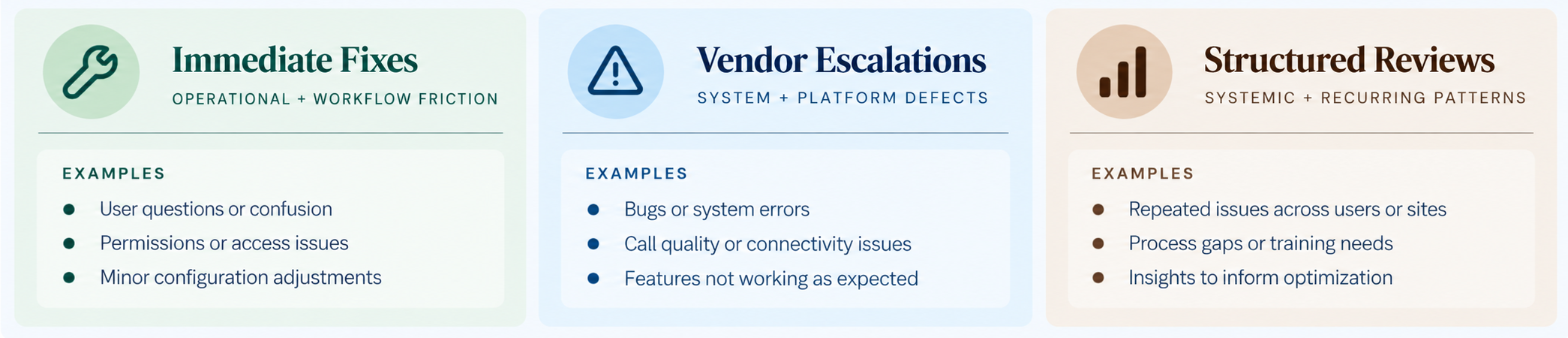
Every one of those questions will occasionally answer itself the wrong way, even in a well-executed deployment. That's the signal hypercare exists to catch. The mistake is treating these findings as isolated exceptions to note and move past. Rather than dismissing these issues as isolated anomalies, recognize them as critical indicators that training fell short or that a workflow misaligns with clinical floor realities. Triage them with appropriate urgency based on their nature:
- Immediate Fixes: Resolve operational and workflow friction on the spot whenever possible.
- Vendor Escalations: Escalate underlying system or platform defects directly to the vendor.
- Structured Reviews: Flag systemic trends and recurring patterns for formal evaluation rather than treating them as one-off incidents.
What doesn't get addressed in this window rarely gets addressed at all. If a workaround endures past 30 days, it ceases to be temporary. It quietly and permanently becomes the unit's standard operating procedure, directly undermining the core objectives of the design and training phases.
5. From Hypercare to Optimization
Go-live is not the finish line. Neither is hypercare. Both are the start of a different kind of work that only becomes visible once people are using the system.
This section traced that progression step by step:
- Maintaining a discipline that resolves the gap register prior to go-live pressure and ensures the internal champion stays active on the floor rather than stepping back when planning concludes.
- It required selecting a rollout strategy intentionally instead of defaulting to carrier preferences. It depended on designing training focused on failure modes and escalation breakdowns, supported by on-site assistance and a peer-led super-user network.
- Finally, it established a dedicated hypercare window to validate these elements under live operational conditions with real patients and full call volumes.
Operational readiness marks the beginning, not the end, of assessing genuine adoption. The first 30 days are a crucial window for assessment. They reveal where the system architecture excelled, which communication tools won the trust of clinical staff, and which escalation protocols need immediate remediation before informal workarounds become ingrained habits.
Part 4 closes out this series by measuring real-world performance, resolving hypercare findings, and establishing the governance model that prevents operational regression. Execution proves the system can go live. Optimization proves it can stay that way.
About the Author
Tony Tobias
Tony Tobias is an EX/CX consultant dedicated to helping organizations build stronger connections between their employees, customers, and communities. With a passion for improving the moments that matter most across the employee and client journey, Tony works with teams to design practical strategies that elevate engagement, strengthen culture, and drive meaningful business outcomes. Outside of his professional work, Tony’s life is deeply rooted in family and friends. With his son and daughter being heavily involved in youth sports, Tony and his wife, Meredith, spend much of their time supporting, coaching, and cheering from the sidelines. Through this involvement, Tony values the lessons youth athletics teach, such as teamwork, resilience, leadership, and character—principles that also influence how he approaches his work with organizations and teams.
Need help navigating your technology decisions?
Our advisory team helps you evaluate, negotiate, and implement — at no cost to you.
Talk To Us