Insights

Insights from the front lines of technology transformation.

Fast Implementation, Big Impact: Deploy Accent Neutralization in Weeks, Not Months

Fast Implementation, Big Impact: Deploy Accent Neutralization in Weeks, Not Months

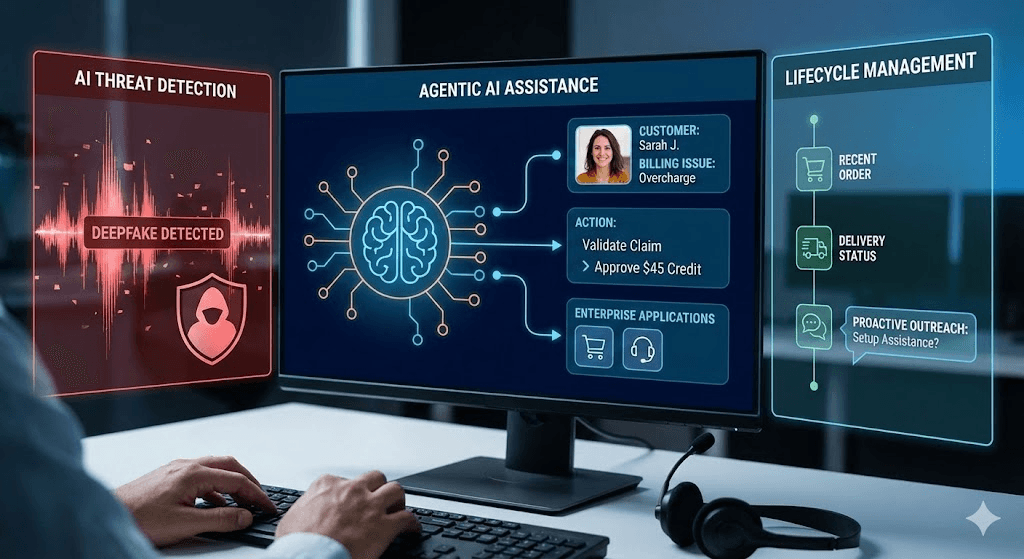
Solve Communication Challenges Without the Long Wait When leaders identify a clear business challenge like inconsistent customer communication, the clock starts ticking. Yet too many technology rollouts are slow, complex, and disruptive, delaying benefits, straining budgets, and eroding project momentum. For contact centers competing on customer experience, these delays can be the difference between leading the market and falling behind. Accent neutralization technology changes that equation. Designed to reduce misunderstandings and barriers in conversations, it can, depending on the use case, deliver measurable impact in weeks rather than months, witout requiring a costly platform migration.

NRNick Richards · September 9, 2025
4 Tips to Narrow Down the Market When Selecting a SaaS Vendor

4 Tips to Narrow Down the Market When Selecting a SaaS Vendor

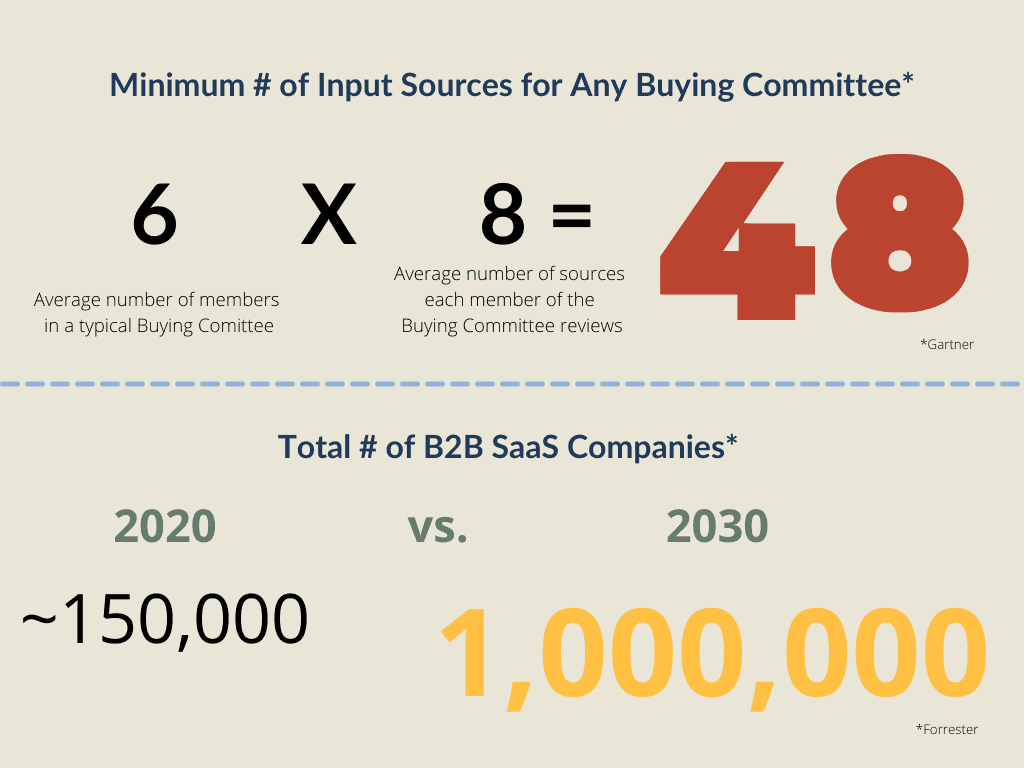
There are over around 150,000 B2B SaaS companies in the market, each vying for your attention. Forrester estimates that the number will reach 1 million by 2030. As workforces and companies change, SaaS solutions are growing more and more prevalent across all industries.  What does this glut of cloud vendors mean for you? It means that you’re going to see an increasing in marketing and vendor sales collateral. This has two consequences: First, it’s annoying. And second, it makes it harder to do research on the products you need. Read: The Problem with Self-Serve Only Purchasing Practices As the vendor ecosystem swells larger and larger, it gets more difficult to sift through marketing documentation and find any concrete information. When all your research leads you to collateral telling you that each specific vendor is the best, how do you tell them apart? Here are 4 tips to cut through the noise and narrow down the market. When you eliminate potential vendors at the beginning of your purchasing journey, you make it easier to compare potential solutions and find what works for you. Spend your effort focusing on real solutions, instead of trying to decipher white noise. 1. Document What You Need Before you start doing research, build a consensus on what you’re buying. This means: Meet with members of multiple teams, including IT leadership and the people who will manage the product once it’s implemented. Document your business goals first. Don’t focus on technology until you know what your company wants to achieve. Analyze what you’re replacing. What business processes do you need to keep? What are you hoping to get rid of with a future purchase?  2. Understand Your Constraints What are your non-negotiables for a new enterprise tech solution? Understanding what you absolutely need helps you narrow down vendors before you even start shopping. Working within your constraints helps you quickly eliminate vendors that can’t meet your requirements. To get a feel for your constraints, think about: Cost: Are you eliminating OPEX, or adding to it? Build vs. Buy: Do you want a fully managed product, or do you want your in-house team to build a custom solution? Timeline: When do you need this installed, and what is driving that deadline? Integration requirements: What existing applications will this new product need to integrate with? Operating Model: Do you want full control of your product, or do you want to outsource some (or all) of the management to a vendor? 3. Define The Vendor You Want When you purchase a cloud application, you’re buying more than just software – you’re buying a vendor relationship. Most monthly contracts are at least 3 years, with financial incentives for even longer terms. You’re entering a long-term relationship, so make sure you choose the right partner. Ruling out vendors that don’t meet your requirements is a good way to narrow down the field. Make sure you consider the following: Vendor Size: Do you want to be a large fish in a small pond, or a small fish in a large pond? Each size has its pros and cons: large vendors can offer reliability while small vendors can offer highly personalized support. Vendor Support: Do you want a vendor support team to fully manage your solution, or do you want to fully manage the software? Vendor Age: Do you want a vendor that is new to the market, or a tried and tested, legacy provider? You may have to sacrifice flexibility for reliability. Vendor focus: Do you want a vendor that does one thing only, or a vendor that provides a whole host of services? Vendor History: Do you want to use an existing vendor? Or do you want to forge a new relationship? 4. Map Your Business Objectives to Specific Features After identifying your business goals, start translating them to technical requirements. This helps you understand the features you need, and lets you ignore the features that aren’t required. Think about: What existing features work well? What existing features cause problems and inefficiencies for users? What specific tools, features, or functionality will help you meet any new business goals? When you’ve answered these questions, you can tune out a majority of the marketing noise to focus on what you actually need. If you’re still having trouble sorting through the noise, reach out – it’s our job to know the differences between vendors, even when it’s hard to tell them apart.

JRJoe Rice · January 4, 2023
CCaaS Operating Models

CCaaS Operating Models

A successful CX transformation involves more than just implementing new technology. One of the key factors of any CX project is the operating model you build moving forward. Gartner writes that an operating model “is the blueprint for how value will be created and delivered to customers.” Think of the operating model as the people and processes that oversee every aspect of your customer experience. It’s more than just technology – it’s how the technology is used. Without a clear CCaaS operating model, you risk alienating customers and upsetting employees. If no one knows who’s responsible for your CX, it makes sense that your CX would tank. To build a successful CX operating model, you need to account for each of the following components: The Key Components for Successful CX Operations Business Relationship Management Someone needs to make sure that the needs of your business are properly addressed by your CX strategy and customer-facing technology. A contact center doesn’t just serve your customers – it also serves the business. Who will communicate each business unit’s needs and goals? How will IT communicate internally to report on progress, updates, and issues? What services need to be delivered, and who determines which services are on the road map? Shared Services Scope Ideally, your CCaaS solution will do a lot of different things. With omnichannel routing, reporting and analytics, AI, and other features, there’s a lot to keep track of. Who will be in charge of making decisions about what services you prioritize, and what you push to the sideline? Someone needs to take the goals of the business and translate them into technical services. This is more than just day-to-day operations or vendor management. This oversight of your entire CCaaS solution. Who chooses what to upgrade, what to fine-tune, and what to replace? IT Architecture & Ops  While the big-picture direction of a CCaaS solution is important, you also need to consider the nitty gritty management of the technology. Who is responsible for making changes to your CCaaS platform? Which engineering resources will be tapped when there’s work to be done? Will they be resources dedicated exclusively to the CCaaS platform full-time? You also need to consider how your new CCaaS platform slots into your existing IT operations. How will helpdesk tickets and IT support end-users when they have a problem? How will this software-based solution fit into your existing WAN environment? Are there security protocols you need to be met? Is there hardware you need to manage? How will you handle a change in SIP trunking or voice delivery? Platform Administration Your CCaaS platform is only as good as the people using it. So how will they use it? You need to define the new roles that come with new technology. What roles will you have, and how will you fill them? What changes can administrators or supervisors make to support their team? How can they customize the tool to meet the preferences of their workforce? How will platform admin and team supervisors interact with IT? Defining these roles helps you iron out responsibilities before you run into problems. Vendor Lifecycle Management Successfully operating a CCaaS platform requires more than just internal management. You also need to determine how you manage your relationship with your chosen CCaaS vendor. What is the vendor responsible for? How do you flag issues or concerns? How do you escalate when a problem grows worse? How involved do you want the vendor to be in the daily operation of your contact center? Who participates in QBRs, and what do you discuss in these meetings? Additionally, who is responsible for sharing your company’s roadmap vision with the vendor? Integrations Any new piece of CX technology you implement is going to need to integrate with every other tool in your Contact center environment. How will you manage these integrations? Who will be responsible if an issue arises, and how will you communicate needs to different teams or personnel? Analytics  One of the key benefits of a CCaaS solution is the sheer amount of data and information it can provide about how you reach your customers, and how they reach you. But you have to know what to do with this data in order to get any benefits from it. How will the relevant information flow from your technical solution to your business analysts and team leaders? Who is responsible for analyzing the data and making recommendations to make your solution more effective? QA Even in a steady-state environment, there will always be changes to make to your CX strategy. Employees come and go; new functionality is added; integrations and changes are added to your technical solutions. So how will you manage these? How will new agents or supervisors get trained on the platform? Do you have a QA team or process for making changes to your solution? How will current agents report issues, make recommendations, or voice concerns? A CCaaS solution is more than just technology – it’s how you use it. Defining your new operating model takes work, but it’s imperative you confirm your future state before you start implementing changes to your CX strategy. A solid operating model allows you to take full advantage of all the benefits a CCaaS solution can offer. Have questions, or want to run your thoughts by us, free of charge? Set up a call with CXponent today!

JRJoe Rice · December 5, 2022
Omnichannel Contact Centers – 3 Benefits Your Business Can’t Afford to Ignore

Omnichannel Contact Centers – 3 Benefits Your Business Can’t Afford to Ignore

In today’s digital age, customers interact with brands through various channels including social media, live chat, phone, and email. As a result, it’s become more critical than ever for businesses to have a robust omnichannel contact center solution in place to meet customers where they’re at. The days of the “call center” are over.   What is an omnichannel contact center? An omnichannel contact center is a centralized platform that allows businesses to manage customer interactions across all channels from a single location. Email, chat, voice, and social media are blended, allowing your agents to track a customer across channels, and access information from any past interaction. Benefits of Omnichannel This type of platform provides many benefits including increased efficiency, improved customer satisfaction, and the ability to obtain real-time insights into customer behavior. 1. Increased Efficiency An omnichannel contact center solution increases efficiency by streamlining the management of customer interactions across all channels. One agent can use the same interface to manage all types of interactions. With no need to toggle applications, your agents save you time and money. Read "4 Ways to Reduce The Hidden Cost of Toggling Between Applications" This type of platform also centralizes all customer data in one location, making it easy for agents to access the information they need in order to resolve customer issues quickly and efficiently. 2. Improved Customer Satisfaction An omnichannel contact center solution also improves customer satisfaction by providing customers with a consistent experience regardless of the channel they’re using. Customers can start a conversation on one channel and continue it on another without having to repeat themselves or start from scratch. This helps to reduce frustration and creates a better overall experience for the customer. 3. Real-Time Insights Another benefit of an omnichannel contact center solution is the ability to obtain real-time insights into customer behavior. This type of platform captures data about every interaction which businesses can then use to improve their overall strategy. By understanding how customers interact with their brand across all channels, businesses can make more informed decisions about where to allocate their resources. How to get an Omnichannel solution The best way to get a fully omnichannel solution is to migrate to a Contact Center As-A-Service (CCaaS) platform. Most of the major CCaaS vendors offer comprehensive omnichannel solutions, leveraging cloud technology to fully integrate your customer experience. Gartner has ranked the major CCaaS providers, detailing some of the unique strengths and weaknesses of each. However, that doesn’t mean the perfect solution is one of these 4 options. There are many other CCaaS solutions out there and CXponent can help you look beyond the magic quadrant. Download our "Look Beyond the Magic Quadrant" White Paper

JRJoe Rice · December 1, 2022
Building & Optimizing the Communication Pillar of the Tech Stack – A Follow-up Q&A with Taylor Wilkerson

Building & Optimizing the Communication Pillar of the Tech Stack – A Follow-up Q&A with Taylor Wilkerson

Taylor is a wizard of contact center technology because he has been on both sides of the contact center. First as an Agent on the end user’s side, where terrible digital employee experience led him to want to learn more about the technical side of things, and now leading a team of technical resources on the vendor’s side. His previous roles, even those before getting into tech, give him a unique perspective on what works and doesn’t work in contact centers. We had Taylor on our Catalyst Club Podcast where he listed a step-by-step how companies can build and optimize the communication layer of the tech stack. Listen to the Episode   With such a hot topic, we had follow-up questions for him to further discuss a couple of the points he brought up in the original interview. 1. You talked a lot about how data should drive smart decision-making. What are some of the best methods to get reliable data about your contact center?   A couple of things I would point out. Have a singular system that routes ALL of your interaction types and has data available via API. This simplifies, significantly, the process of accessing data whether for reporting purposes or for WFM. If this is not possible, then ensure that the data is accessible via API and you’re leveraging similar metrics. The important part of the metrics is understanding the algorithms utilized. With different systems, there could be different algorithms used – and this could impact your data. Therefore, ensure you can access a stream or download the data via API to a data warehouse for one place of storage and then, utilize a third-party tool like PowerBI or Tableau (which most customers do) to build out custom reports aggregating data across, not only CX tools but multiple third-party systems. Be consistent – don’t let multiple departments internally define metrics and KPIs in different capacities. Simplify the steps, and ensure that things are efficient. These steps make your data better. Consistency is key.   2. If someone can’t fully migrate to the cloud right now, what are some good “baby steps” they can take to start their CCaaS journey?   First, understand what the reasoning is for “why” they cannot migrate. Sometimes, it’s a cost issue, other times, it’s security and compliance. However, in most circumstances (from my experience), we can work around those issues with cloud-based solutions. A good example of this is enterprise or commercial-sized organizations that have thousands of employees (who are UC users) and only hundreds of contact center agents. They need to continue depreciating the cost of a legacy (often, on-premises) PBX such as Avaya or Cisco but need to enhance their contact center solution. In these situations, organizations can invest in a cloud-based solution for the contact center to enhance their agent and customer experience, while integrating and maintaining the on-premises PBX to continue depreciating costs. This is just one example (and a reason why an API-based platform is so critical).   Some good baby steps are:   Documenting the limitations, scalability, issues, and problems that arise and continuously providing a dollar value to this. Eventually, this will add up and help in the conversation.   If you’re not ready to go completely cloud, then look at possibly leveraging a digital-only CX solution, especially if you’re voice-only or pay for add-on licenses with your premise software today. This provides organizations the ability to enhance, at least, a portion of their CX. Further, there are now digital-only contact center offerings that can start as digital-only, but eventually be upgraded to a full omnichannel offering. 3. A quality team is key to managing ANY solution. What are some ways an IT leader can ensure their team stays knowledgeable on market trends and new solutions?   Sign up for updates with industry leaders on LinkedIn, blogs, or via independent providers such as Gartner or G2. I was at a QBR once where the top AE performer was asked what he/she does differently — the response (not exact): “I spend an hour a day reading articles on CX. I go on google and search for what our competitors are doing, what industry experts are saying, what customers bring up in meetings or trending on social media. This allows me to consistently stay in touch with my customers and their trends and be ahead on all of my next steps.”   While this was a response from an AE, it’s relevant within the industry as well. And yes, it seems simple, but continuous education through reading/listening, attending tradeshows, regularly monitoring agents and/or asking for feedback from agents on a recurring basis, and meeting with other leaders in the CX space to understand what they’re doing (positive and negative). From what I’ve seen, if you prioritize this type of education, learning and mentorship, you’re able to successfully not just understand the technology trends, but be on the upwards curve of them.   4. What’s a new CCaaS tool or technology that you’re excited about?   I would say automation tools on the backend, such as CLI or terraform. While they’re not necessarily new to contact centers completely, the exciting part is that organizations can utilize these types of tools to automate processes and deployments that would’ve taken extensive time down to a much smaller time frame, allowing for quicker overall impact. While these are great, CX platforms also still offer significantly more intuitive UIs to allow for management on the backend for non-technical people as well   If I had to choose a specific tool, I would probably say a journey analytics tool, such as Pointillist. A journey analytics tool allows organizations to gather data from a multitude of sources (think website, CRM, CX solution, ticketing system, database, etc.) and tie it into profiles and customer journeys. This allows teams to visually understand what happens when a customer completes actions, like making a payment. However, it’s not just the contact center interaction, but instead, the journey that led up to that action, the build-up, how many other customers followed a similar path — and then, the aftermath that happens as well. Customer journey analytics are allowing organizations to transform the customer experience for the actual entire journey in an easier capacity than before.   For specific tools – I would say AI in WEM (WFM/QM). Continuous scheduling, gamification, and automated evaluations – are all tools that are becoming more-and-more commonplace in the marketplace and are allowing admins and contact center agents to perform at significantly higher rates.   

JRJoe Rice · November 14, 2022
What’s the Difference Between CCaaS and UCaaS?

What’s the Difference Between CCaaS and UCaaS?

If you work in tech, you’re no stranger to acronyms. Some are commonplace (it’s pronounced “gif”) some are redundant (SD-WAN network) and some sound so obscure you need to google them just to be sure what they’re even describing. And if you work with cloud technology? Well – RIP. There are a lot of acronyms that sound the same but describe vastly different apps. Case in point – CCaaS and UCaaS. These acronyms are just one letter apart, but hugely different in terms of function. And yet… UCaaS and CCaaS apps can integrate with each other in a number of different ways. It’s easy to get the two confused. Let us break them down. How are UCaaS and CCaaS Similar? They’re both: cloud platforms that host a suite of tools and services to support your business’s communication needs. able to replace on-premise infrastructure that hosts legacy apps. Software as a Service. This means you pay for them monthly, typically through a license-based subscription model. housed and managed by vendors, who frequently update the solution, add functionality, and manage issues How are UCaaS and CCaaS Different? UCaaS UCaaS stands for Unified Communications as a Service. It’s a suite of tools that allows your company to communicate both internally and externally. UCaaS replaces things like POTS lines, faxes, and chat tools. Some of the most common UCaaS features include: Active Directory Phone service Chat Video conferencing The key word in UCaaS is “unified.” UCaaS allows you to integrate all of these technologies, allowing you to seamlessly switch between them, and communicate more effectively. With UCaaS, your tools work together to provide a cohesive communication strategy. Unifying your communication tools gives you add functionality that you might not otherwise have. The ability to see if someone is currently in a meeting, on a call, away from their computer, or available for a call/chat (also known as “presence”). View people’s calendars and schedule meetings in any application. Click-to-Call functionality allows you to make calls directly from your browser. Send voicemails directly to email for your review. Single sign-on allows you to quickly access all apps at once. Move from chat to video call to conference call all with just a few clicks. CCaaS CCaaS stands for “Contact Center as a Service.” CCaaS is a platform that hosts all the tools you need to effectively run a contact center. CCaaS takes your on-premise applications housed in your data center and moves them to the cloud. Some of the key features of a CCaaS platform include: ACD/IVR WFM and Workforce Optimization Call recording and storage Data and analytics Omni-channel capabilities (integrating chat, voice, social media, and email channels) Transcription services CCaaS gives you a load of benefits you can’t get with an on-prem contact center solution. Moving to the cloud is the best way to leverage new technology to improve your customer experience. By using CCaaS, you get: Improved reliability: a cloud-based app gives you improved redundancy and a 99.999% uptime guarantee. Easy integrations: APIs and vendor engineering resources mean you can integrate your CCaaS platform with your CRM, your preferred apps, and yes, even your UCaaS tools. Cutting-edge technology: With a CCaaS platform, vendors are constantly releasing updates and leveraging new technology. Things like AI, sentiment analysis, and WFM tools are available to you. Omni-channel: All the major CCaaS vendors provide an omnichannel experience, improving both customer experience and agent productivity. Can CCaaS and UCaaS be Used Together? CCaaS platforms can integrate with UCaaS apps, allowing your users to make calls, chat with customers, and respond to emails in the applications they’re already using. You can also use CCaaS technologies to make call trees for front desk lines and internal support numbers. By combining the two, you give your agents the ability to work reliably anytime, anywhere. Want to learn more? Moving to the cloud gives you huge benefits, but it can be confusing. No matter where you’re at in your journey to CCaaS or UCaaS, we can help you sift through the glut of online info and find what’s relevant to you.

JRJoe Rice · November 1, 2022
Build vs. Buy – A Follow-up Q&A with Dominic Pasta

Build vs. Buy – A Follow-up Q&A with Dominic Pasta

Dominic Pasta has a lot of knowledge when it comes to technology transformations. With experience at Groupon, Rocket Mortgage, and Aon, Dominic is no stranger to contact center transformation. On episode 3 of the Catalyst Club Podcast, we discussed an increasingly important question in the CX space: Is it better to build or buy your contact center solution? Dom shared advantages and disadvantages to both approaches. Listen to the episode There was just too much to discuss during our conversation so decided to take a deeper dive on a couple of topics in a follow-up Q&A. 1. There’s a lot of noise in the CX/CCaaS space. How can CX leaders learn more about potential solutions to determine if buying software or building a contact center is the right path for them?  I think there are a few things CX leaders can do to navigate the client experience technology space. First, I typically like to periodically review new SaaS providers as they enter the market, identify the areas they are trying to exploit or differentiate themselves and understand how that plays out in the wider industry. It gives a pulse on the industry direction, and where you can go to the market to leverage bought technology to drive value vs. building in-house. Second, I like to attend industry events and conferences, network with other peers, and talk through how they are solving similar challenges to me. Nothing tends to beat experience in the space, and this can be extremely valuable and carving through the noise. Speaking of experience, I also highly recommend engaging a firm that specializes in the CX/CCaaS space. Having a firm that has been through the trenches, multiple times, with multiple different challenges can help ensure you are making the right decision on the buy vs. build strategy at your firm.  2.  No matter what route you take to get there, what are some ways to remove friction and increase adoption when launching a new contact center?  There are a lot of challenges to ensuring the successful adoption of a new contact center, but I think the primary focus is ensuring you’ve set up a collaborative environment across all stakeholders required to realize this through to delivery. Everyone who will be responsible for the successful delivery of the platform, regardless of at what stages, should be engaged up front and kept informed of progress as the project moves towards completion. Further, focus on the value of the delivery, not just the technologies/features you are delivering. The concept of “what’s in it for me” and “where will this take us” drives excitement towards adoption, not just another forced technology platform that needs to be used day-to-day.   3.  You mentioned that buying a solution from a CCaaS vendor means that updates are pushed through on the vendor’s schedule. How can customers advocate for their needs and goals when working with a CCaaS vendor?  Typically there are two forums for ensuring your organization’s needs are heard by third-party vendors. First, and most primary, is your success rep which most SaaS firms provide with their product. Leverage your success rep in the same way you would an internal resource. They should fully understand your strategy, vision, and where you are looking at taking the client and agent experience in the future. This should be irrespective of whether or not their technology solves that vision in part or in its entirety. This helps the rep work with their resources to find optimal ways of leveraging their platform, in conjunction with other systems, to meet those requirements while also ensuring that gaps in the system they see are pushed to internal product teams. Customer Advisory Boards are the second forum I’ve seen be extremely successful. It tends to be a structured 2 – 3 day offsite where you sit with other users of the platform, and help carve out the roadmap and features for the next year. It also gives you the ability to understand how other users of the same system are solving similar problems, and collectively helps ensure the product vision is driving in the direction the wider user base is expecting.  4.  At the end of your conversation, you touched on the idea of technical debt. What are some ways CCaaS leaders can avoid technical debt?   I think there are two things CCaaS leaders can do to help avoid technical debt. First, have a long-term vision of the experience you are driving towards, how you plan to operationalize that experience, and what value is underpinning it. After that, ensure every decision that is made is driving towards that vision. We tend to get caught up in the day-to-day, the immediate “this is a problem now”. Well, those problems tend to result in band-aid solutions as well as resources pulled from that longer vision. An accumulation of these band-aids is the first way you end up with massive tech debt. Second, double and triple check those “must have customizable features” are really necessary. The “my contact center is different because…so I absolutely need this feature” tends to not pan out as the industry evolves, and those customizable aspects of the system become hard to unwind and take advantage of new innovations in the space as they become available. 

JRJoe Rice · October 31, 2022
4 Ways to Reduce The Hidden Cost of Toggling Between Applications

4 Ways to Reduce The Hidden Cost of Toggling Between Applications

Multitasking used to be a strength people bragged about in job interviews. In today’s workforce, however, multitasking is a basic job requirement. Employees in every department are constantly balancing a huge array of applications, notifications, messages, spreadsheets, deadlines, action items, and huddles. It’s a lot. Most people have learned to divide their attention to succeed in business. But what cost does this constant ping-ponging between applications have to businesses? The people at Harvard Business Review conducted in-depth research on the topic of application switching, and the results were startling: average employees switch applications and web pages nearly 1,200 times a day. Beyond that, they were able to quantify just how much time it takes to adjust to a switch: 2 seconds. That means that in one day, an employee spends 40 minutes waiting for a new app to load, adjusting to the new visual field of a spreadsheet, or trying to toggle from one page to another. That’s over 3 hours in a work week. In a full year? The average employee spends nearly 5 working weeks switching between apps and web pages. That’s 9% of the time they spend at work. The Cost is Greater Than You Think This is a huge, tangible problem for businesses. But the problem is bigger than you think: Here are three main takeaways from this research: Huge Costs for Diminishing Returns. There’s a very real monetary cost here: first, 9% of your workforce’s salaries are effectively wasted. On top of that, the apps you pay for are causing this waste. By incorrectly optimizing your app ecosystem, you’re spending money to pay even more money. Productivity Problems. This is a huge time-suck: that’s 9% of your workforce flushed down the drain, and it’s accepted as the cost of doing business. On top of that, we must reframe how we view technology purchases. We used to think of apps as tools in our workday. But business leaders need to understand that apps now impede efficiency. They make it harder for us to do our jobs. Functionality Overlap. Large companies now deploy around 187 apps on average. And research shows that nearly one-third of them are either redundant or add little actual value to the company. So not only are we wasting time with all our apps – we’re wasting our time on apps that don’t always add any value to the company. Emotional cost – Frustration Taxation. Most modern workers are tech-savvy. And this means that they can understand when tech is actively impeding them from doing their job. Think about it – how many times have you grumbled while you wait for an email attachment to open? How many times have you been frustrated when a web page took forever to load? How many times have you said, “this stinks,” as you waited for a key app to finally start working? Your employees feel it too. And the amount of time spent dealing with tech is frustrating. How to avoid the Toggling Tax Most people see the toggling tax as the cost of doing business. But you shouldn’t have to pay. Here are some ways you can cut that tax down to zero: 1. Sit with your users. Watch how people use the apps. Where do slowdowns occur? Where are integrations possible? What frustrates your employees most? It’s time-consuming, but your end-users will know about problems in your app ecosystem better than anyone. 2. Review your integrations.  Are you getting everything you can out of your apps? Which integrations work, and which ones don’t? Are you missing out on any key integrations that will make a smoother business process for your users? 3. Conduct an application audit.  See what people use and don’t use. Think about overlapping functionality, niche software, and mission-critical tools. Reviewing your entire application library helps you see what you need and what you can eliminate. And when you get rid of excess applications, you make a better experience for your users. 4. Take the burden off your users. Be strategic about how you use apps and the options you give your employees. You can use screen consolidation tools for contact center employees. You can standardize one single UC platform across all employees. When you make the call, you help your employees avoid paying the toggling tax. Not sure where to start? CXponent is a proven champion at network stack audits. We can help you review your applications and make sure you’re avoiding the toggling tax. Reach out today!

JRJoe Rice · October 24, 2022
Platform or Point Solution: Which one is right for you?

Platform or Point Solution: Which one is right for you?

When you have to make a change to your contact center, you’re faced with a lot of decisions. First off, you have to choose – do you build a custom solution or buy prepackaged software? You might think that choosing to buy new software is the easiest path forward. But when you decide to buy new contact center software, you’re faced with an even larger decision – just what the heck are you supposed to buy, anyway? There’re thousands of vendors selling even more thousands of products. From Gartner leaders to fledgling startups, each vendor promises that their solution will solve all your problems. How do you narrow down the field to make sure you’re getting what you need? One way is to decide: do you want a contact center platform or a point solution? What’s the difference? Simply put, a contact center platform is a large-scale solution that is designed to do many things, serve many people, and be rolled out quickly. A point solution is a piece of software that is designed to solve a single, specific problem. Contact center platform: Your Base of Operations  A contact center platform is a solution that handles everything: customer contacts, WFM, reporting, and more. This is your main contact center software. Think along the lines of Genesys, NICE CXone, or Talkdesk. These are solutions that provide basic (and advanced functionality to all your agents. When you buy a contact center platform, you’re essentially buying a new contact center. These platform solutions are not as customizable but are typically managed by the vendor. This means that they take off a huge burden from your team: the vendor manages updates, helps with integrations, and leads you through implementation. Who should buy a contact center platform? Go for a contact center platform if… You have lots of problems you need to solve You want to re-design multiple facets of your contact center You have relatively straightforward demands You’re buying a solution that will be rolled out to all users, regardless of role Point solution: The Perfect Fix for Your Biggest Problem If a platform is a large base of operations, a point solution is a much smaller purchase. A point solution is typically a standalone piece of software that integrates with the tech stack. This software is designed to solve a specific problem. It might not offer global functionalities for all users, but it helps you refine and improve your contact center with an element of control. Point solutions are great if you want to bolster a specific function (such as reporting, transcription, or WFM), but don’t want to drastically redesign your contact center. There are a lot of great solutions out there for nearly any problem. Unfortunately, they often come with a bit of higher demand on your team, as they may require more coding or work to integrate with your existing ecosystem. Who should buy a point solution? Start searching for a point solution if… You have one or two problems or inefficiencies in your contact center that are causing you a lot of grief You want to bolster a specific team or function of your contact center You can easily integrate new software into your contact center ecosystem You’re happy with your basic platform but wish it had a few extra bells and whistles Choosing what you want to buy helps you find the best solution.  If you’re still not sure what to buy, we can help. At CXponent, we’re experts at translating customer goals into technical solutions. We can help you choose between a handful of contact center platforms, or help you sift through the endless sands of point solution software. Let's talk!

JRJoe Rice · October 10, 2022
5 Differences in Building vs. Buying Contact Center Technology

5 Differences in Building vs. Buying Contact Center Technology

There’s an overwhelming number of SaaS vendors, and that number is only growing. Even when you narrow it down to just contact center software, it’s impossible for just one person to keep track of all the different vendors and tools in the market. Each vendor is constantly adding features and functionality; each tool is constantly changing and evolving. These endless permutations of software put a huge burden on buyers to constantly scan, research, and filter for relevant information. When buying contact center technology, buyers now need to spend an inordinate amount of time validating possible solutions. That leaves less time for building consensus on requirements, less time for cultivating relationships with vendor teams, and less time for actually buying the software you need. At CXponent, we like to think of this additional stress that comes with purchasing CCaaS tech as “the burden of buying.” Because of the burden of buying, some people choose to build their own, either with APIs and CPaaS or by adding on to homegrown solutions. Building a solution gives you flexibility and full customization power. But it comes at a cost. Differences between buying and building There’s no right or wrong way to make changes to your contact center. When should I build? You have strong developers and engineers on your team Just need one application/tool – no need for a large platform Your team has the capacity to develop, maintain, and upgrade a proprietary solution You have unique, specific requirements that are not typical You have an essential integration that you want to be responsible for and/or some legacy, on-premises applications you need to maintain When should I buy? Your team doesn’t have the expertise to oversee a customized solution Your team doesn’t have the time/capacity to dedicate to one solution Your requirements are fairly typical for your industry You either need a full suite of tools or want to upgrade to a fully cloud-based platform You want a vendor that will be responsible for future upgrades and functionality The table below provides some more detail on when to build and when to buy:   Building (Pure development API platforms; CPaaS) Packaged Software Developer Resources Surplus of developer capacity to build. Limited or no development resources. Operating Model Preference Surplus of developer capacity to maintain applications. System and tool admins. API Flexibility Maximum options – especially strong when built on company core products. Varies from vendor to vendor – Most solutions offer some flexibility, especially in UX/UI. some solutions offer increased API flexibility. Maintenance Responsibility of developers to maintain and upgrade the applications built. App development is entirely the responsibility of the vendor. Security and Compliance Guaranteed to meet internal requirements. But at risk of changing compliance requirements (i.e., GDPR, FEDRAMP, etc.). Vendor is entirely responsible for maintaining compliance. However, at risk of not meeting internal requirements. Risk Tolerance Higher risk; Comfortable shouldering sole responsibility for application failure. Lower risk: Burden of risk is split between vendor and client. Future Development Sole responsibility of your team. Complete control of how the app develops. Responsibility ultimately lies with the vendor. They take input from thousands of customers to create new features that meet demand. Worried about the risk of building instead of buying? If you think custom development is right for your team, but are worried about the risks, here are some things to consider: Your Team. Do you have the resources and people power to build something and then maintain it? How much time can they realistically spend on this? The Problem You’re Solving. Custom software development allows you to fully solve specific problems in your organization. But what is the incremental business value you’ll get through development that you can’t get from a vendor solution? Your timeline. Developing and refining a custom solution takes time – it’s much longer than implementing an existing vendor solution. How much time do you have to develop an in-house solution? Is the time spent on development worth it? Want to learn more? Dominic Pasta talks about the build vs. buy conundrum in episode 4 of the Catalyst Club Podcast. Check it out to learn more!

JRJoe Rice · October 5, 2022
4 Tips to Making Smart Decisions When Buying Tech

4 Tips to Making Smart Decisions When Buying Tech

Analysis paralysis is real. It’s what happens when you need to decide, but are faced with so many choices, so much data, and so much to think about… that you end up not even making a decision at all. Studies show that the more choices you have, the harder it is to actually make a choice.  This may explain why you endlessly scroll on Netflix, instead of choosing something to watch. It could also explain why a simple trip to buy wine for a dinner party suddenly fills you with existential dread. With so many options, your mind gets paralyzed. Unfortunately, this cognitive conundrum affects more than just your decisions about what to watch or what to drink. It can have disastrous effects in the business world as well. Think about the number of choices you have when you buy a new enterprise IT solution. There are tens of thousands of SaaS vendors out there, and there are going to be tens of thousands more in just a few years. If you need to purchase a technical solution, it’s easy to get completely overwhelmed by the sheer number of choices you have. If you need to buy enterprise tech, here are four ways you can shake the analysis paralysis and start narrowing down the field: 1. Identify your guiding principles There are tons of options out there. But how many will help you meet your business goals? Before embarking on a buying project, make sure you explicitly write out your business purpose and objectives. Use these goals as a map of your buying journey. If a product doesn’t help you meet your goals, don’t even consider it. 2. Embrace Constraints The vendor ecosystem is only going to get bigger. One way to combat that is to forcibly narrow the window of what you’re looking for. Think about core system integrations that you absolutely need. Considering security and compliance requirements a new solution needs to be hit. What are your budget requirements? Eliminate any solutions that don’t hit these requirements. You have enough to think about – why waste time considering solutions that don’t fit? 3. Think about Your Operating Model No IT solution is simply plug-and-play. How do you want to run your IT ecosystem in the future? Do you want to custom-build a solution, managing every detail? Or do you want to sacrifice some flexibility for ease of use and reliability? Consider the resources on your team. Do you have the expertise to build out a new platform, or manage a software integration and go live in-house? Think about what you expect from your team. It’s also important to think about what you want the operating model to be in the future. Focusing on your operating model helps you eliminate vendors that don’t fit your future visions. 4. Consider the Vendor Sometimes the vendor is just as important as the product. Think about what you want out of a vendor. Do you want a reliable, inflexible old-school telco? Or do you want a new start-up that can get you great rates on a product that isn’t as battle-tested? When buying network technology, different products can appear very similar, both in terms of functionality and price. For instance, SD-WAN boxes won’t differ too much from each other. When this happens though, considering vendors helps you avoid analysis paralysis. Some vendors provide much more hands-on implementation services and account management. Others give you robust reporting. Others give you free rein to do whatever you want. The size of the vendor matters. If you’re a large client at a newer, smaller vendor, they might give you tons of attention, even building out functionality for your needs. But at an older, larger vendor you sacrifice this for reliability. What’s more important to you? See: 4 Ways to Improve your Vendor Management Skills Making a Choice Is Hard. With so many vendors, so much marketing, and an overwhelming amount of online noise, it’s harder than ever to make a decision. Narrowing the field can help cut down the noise and give you the clarity you need to move forward on your buying journey. At CXponent, we use our vendor expertise to narrow down the field for you. Want to learn how? Let's Talk!

JRJoe Rice · September 12, 2022
Catalyst Club Episode 5 – Getting people on board technology transformations with Rich Mozack

Catalyst Club Episode 5 – Getting people on board technology transformations with Rich Mozack

It’s easy to talk about IT transformation. But Rich Mozak has actually done it. As an IT leader for over 20 years (10 of those years spent as a CIO), Rich has helped several companies completely revolutionize their IT spending. From network design to business software, Rich has experienced the trials and triumphs that come with leading an organization through an IT transformation. After working as a systems engineer at IBM, Rich quickly moved up the ranks as an IT leader. He first became CIO at a mid-level retailer in 2003. This company declared bankruptcy, forcing Rich to make difficult choices and take huge risks to streamline his IT spending. His next CIO role was at a large-scale retailer, working to scale up IT to meet the demands of tech-savvy customers. Finally, Rich worked as CIO at a large insurance broker. Here, he discovered a passion for developing personnel and helping future IT leaders. Now, he works as an executive coach and consultant within the tech space.   Listen to the full episode Here are some of his top tips for embarking on an IT transformation project of your own: Identify your 3-5 main objectives for the project. Make sure everyone understands why you’re embarking on an IT transformation journey, and what the goals are. Every single person involved should be able to give the elevator pitch for your transformation project. IT Transformations are about more than technology – they’re about changing business processes. There is a human element to any system change. You need to make sure business leaders and employees are ready, and that the new processes are clearly outlined. Migrating to a new system means you might not immediately have all the functionality you currently have. Make sure business leaders know what functionality they’re gaining. But also, be sure to outline any functionality that people will be losing. The Humanity Behind Technology Rich decided to focus on developing personnel for a reason. An IT project will only get as far as the people working on it. And technology will only be as successful as the people who use it. With any IT change: 20% of people will be very excited about new tech 20% of people will be extremely resistant to any change, no matter how minor That leaves 60% of people for you to win over. How do you do this? By making sure that everyone knows what you’re doing and why you’re doing it. You can’t just tell people you’re migrating to a new platform. You need to tell them why you’re migrating to a new platform. You can also gain people’s trust by being honest about challenges. Sharing a full picture of what to expect will help believe in your vision. No migration is free of issues and be upfront about the issues facing your transformation project. But what about when your organization is too big, and you can’t make sure that every person is on board? That’s when you leverage a buying committee. Using a buying committee to drive IT transformation A buying committee is crucial to success. Together, members weigh in on key decisions, such as those requiring more money, large changes, or adjustments to the timeline. In doing so, they drive alignment from their respective sectors. A good buying committee is made up of business leaders from every aspect of your organization, not just IT personnel. Before embarking on any IT transformation, be sure to pick your buying committee carefully. And make it clear that if you don’t have engagement from business leaders, then the project won’t get off the ground. What to Do When You Start Second Guessing  IT transformation is difficult. And no matter how tight your project plan, there will always be a point where you’re faced with complex problems, overdue deadlines, and tech that doesn’t work. When faced with these problems, just keep thinking back to your 3-5 main goals. If the problem you’re facing stands between you and your objective, then just keep pushing. Trust in your team and trust in the technology to transform your business.

JRJoe Rice · August 29, 2022
How Artificial Intelligence Benefits Contact Center Agents and Enhances Customer Experience

How Artificial Intelligence Benefits Contact Center Agents and Enhances Customer Experience

Artificial Intelligence (AI) has been a topic of curiosity since the classic movie, 2001: A Space Odyssey. But what exactly is AI and how can it help in a contact center environment? Put simply, AI is an advanced application that uses real-time data and leading algorithms to solve problems. It is essentially a more evolved form of chatbots. AI can offer several operational tools, such as voice recognition, chat programs, analytics tools, and sentiment analysis software. There are benefits of AI for both digital employee experience (DEX) and customer experience (CX). For DEX, AI can manage simple customer requests and offer real-time data to agents during customer interactions. On the CX side, AI provides self-service options, 24/7 assistance, personalized experiences, faster solutions, and less friction. However, AI is not a replacement for human interaction. You still need human agents to solve problems and to meet customers’ needs. Additionally, it requires a quality engineer and CX leaders to optimize the benefits of AI. If you’re considering implementing AI into your contact center, make sure to build a plan that identifies business outcomes to achieve with AI. Decide on a vendor or app, identify product owners who can keep track of the tool, and provide training to your team on how to use it effectively. Don’t let AI scare you. It’s just another tool in your company’s toolbox that can enhance your CX strategy. If you have questions or need guidance, our comprehensive review of different AI products and tools can help.  

JRJoe Rice · August 23, 2022
Catalyst Club Podcast Episode 4 – Build vs. Buy – how to determine the path forward with Dominic Pasta

Catalyst Club Podcast Episode 4 – Build vs. Buy – how to determine the path forward with Dominic Pasta

Dominic Pasta has a lot of knowledge when it comes to technology transformations. With experience at Groupon, Rocket Mortgage, and Aon, Dominic is no stranger to contact center transformation. That’s why we were so excited to sit down with him on the Catalyst Club Podcast. Listen to the episode We discussed an increasingly important question in the CX space: Is it better to build or buy your contact center solution? The answer: It depends. Dom shared advantages and disadvantages to both approaches: Building a contact center solution: Pros: Gives you a product that 100% meets your needs Allows you to have full control over future releases Realize your end-to-end vision Cons: Potentially lose out on cutting-edge features and functionality Building for the here and now means you sometimes ignore where the industry is going Engineering resources required to build, launch, and support an in-house solution can be costly Buying a contact center solution: Pros: Access to features you might not have even known existed Vendors have insights from multiple clients to help improve your customer journey 24-hour support services Easy onboarding for 3rd-party BPOs Cons: You’re tied to an external firm’s development pipeline Might not have access to all the features you want or need Your vision and the vendor’s vision might differ – it’s another team to manage How do I know which path to take? There are some key items to consider when deciding to build or buy a new solution: 1. Understand what the customers are demanding of you Look at the data to see what your customer use, and where the customer journey breaks down Consider your objective – why do customers reach out to you, and why do you want them to contact you? How are competitors handling customer interactions? Where does this differ from your strategy? 2. What tools are available to you? What technology is already used in your contact center? What’s available on the market? What’s your budget for new technology? Do you have the resources to support new technology? How many changes can you support at once? 3. When do you need to go live? How much time do you have to implement changes? What’s your plan to get from current state to future state? Are you launching everything new all at once? Or are you taking an iterative, agile approach? Comparing Costs can be tricky. In-house solutions are traditionally viewed as CAPEX, while the monthly costs of a CCaaS solution are viewed as OPEX. This can make it difficult to compare the two and justify jumping from a built environment to a purchased solution. But this ignores a lot of the hidden, recurring costs of an in-house contact center. What about: Engineering resources required to manage and upgrade a custom contact center NOC-grade support Network costs Time spent planning and designing upgrades vs. a vendor pushing upgrades Added costs of third-party VARs and technology partners that help support your solution When you add it all up, you might be surprised that an in-house solution is more expensive than you realize. It all comes down to weighing the needs of your clients against the capabilities of your team.  If you’ve checked out previous episodes of Catalyst Club Podcast, you won’t be surprised by what Dom told us: Use data to drive your decision-making! Data can help you understand your customer journey from beginning to end. By analyzing where and how you lose customers, as well as your contact center’s most efficient areas, you gain insight into where you need to invest. Does this sound like what we heard from Taylor and Sinead? What can we say – the data doesn’t lie.

JRJoe Rice · August 15, 2022
Avoiding Buyer’s Remorse – How to Live The ‘No Regrets’ Life

Avoiding Buyer’s Remorse – How to Live The ‘No Regrets’ Life

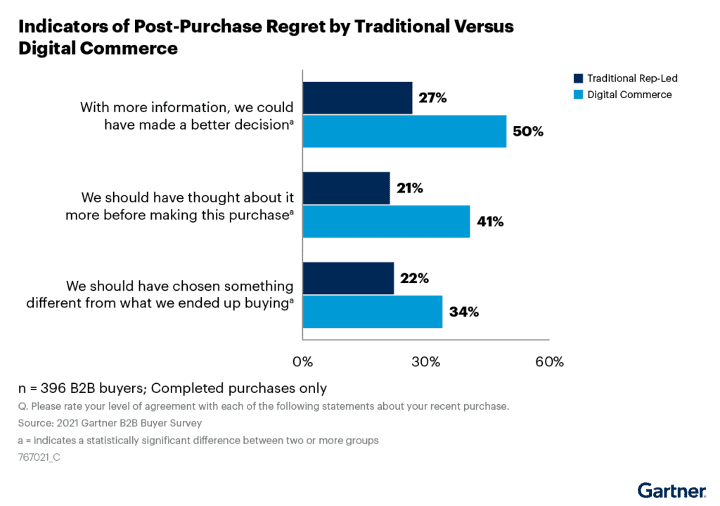
There’s an old saying that states that the best way to avoid buyer’s remorse is not to buy something right away. If you still yearn for it, days/weeks/months later, you’ll be less inclined to regret your decision when you buy it. Unfortunately, when it comes to B2B purchases, it’s not that simple to avoid buyer’s remorse. What makes buyer’s remorse different from B2B is that in addition to large purchasing costs, it’s also your name, your career, on the line. When it comes to large investments, pushback is inevitable – so doubt is inevitable. In a 2021 Gartner survey where two-thirds of the B2B buyers spent over $100,000 on a purchase: 34% think they should have chosen something else 41% wish they had taken more time to make a final decision 50% agree that a better decision could have been made with more information In the above model, the numbers are shaved slightly when you work through a more traditional sales representative-led journey. But they are still high when we are talking about an investment of six figures or more. What’s even more perplexing about these figures is that this level of buyer’s remorse is avoidable! There are five key advisory-driven milestones that cover most issues that cause regret: 1. Build a “Guiding Principles” document. Guiding Principles act as a set of rules to keep you in check during your buying journey. These principles are set up to align expectations for everyone during the process. For example, “we will not overdesign, or under design” can be one of the principles. Every decision made must align to at least one of these values or its out. Make at least three and no more than six depending on the scope of the initiative. Remember, keep it simple, but in line with your organization’s vision. 2. Define a realistic budget. Just like when you buy a home or car, you have a maximum number that you can afford. But how many times has an agent shown you something outside your budget but looks and feels amazing? Do not get distracted by the shiny thing! Know your budget. Stick to your budget. And most importantly, align it with your Guiding Principles. 3. Build “x-haves” lists. Create a list of the required incumbent solution’s features. When new vendors present their features, sort them into “must-have” or “nice-to-have” buckets. This will limit you from over-designing and under-delivering. Ask yourself, will we use this and why? What does it really solve if we do? What would it benefit? Or – why can’t we function without it? 4. Step outside the vacuum. One of the biggest mistakes buying committees can make is not getting input from the employees who will actually use the new solution. Including business units in the decision have many benefits. One is that it will help them better understand how it will improve their day-to-day. It will expedite their buy-in and adoption of the new solution. Another is that running the “x-have” lists with them will build a strong use case for the final decision. 5. Use your “Audit Trail” to get leadership approval. Milestones one through four are combined to form an Audit Trail. This is the information you’ll use to get leadership on board with your decision. Guiding principles have kept the buying committee in check. The budget is realistic. The requirements are sorted and tied back to the Guiding Principles. And most importantly, BUs that will be affected by the new solution has given their input. Buyer’s remorse is avoidable. Sure, you’ll have unknown factors and risks in any buying decision. But if you work with an advisor to hit the milestones above, the gaps that typically cause regret will be covered.

JRJoe Rice · July 31, 2022
Catalyst Club Podcast Episode 3 – Building and Optimizing the Communication Pillar of Your Tech Stack with Taylor Wilkerson

Catalyst Club Podcast Episode 3 – Building and Optimizing the Communication Pillar of Your Tech Stack with Taylor Wilkerson

Taylor is a wizard of contact center technology because he has been on both sides of the contact center. First as an Agent on the end user’s side, where terrible digital employee experience led him to want to learn more about the technical side of things, and now leading a team of technical resources on the vendor’s side. His previous roles, even those before getting into tech, give him a unique perspective on what works and doesn’t work in contact centers. Listen to the full episode So how do you build and optimize your contact center? Analyze and understand data. There are many things you need to be aware of when looking to implement changes. First, you need to identify the purpose or goal that you want to achieve with your contact center. Next, you need to identify tools and processes that you already have and could be implemented to increase employee experience. Remember that a positive employee experience leads to a positive customer experience. Finally, you need to understand your customer. Where do they live? Who are you marketing to? Who are your typical callers? What are the typical profiles associated with them? How do they want to speak with you? What are they looking to accomplish? What are the reasons they are reaching out to you? Once you have all this data, you can build a framework by making data-driven decisions. Clean data is essential for driving contact center optimization. With clean data, you’re able to see the contact center you really have, instead of the one you think you have. You can learn: Reasons behind: Long wait times Abandon rates Transfer rates Customer touches that can be improved by self-service/increased automation More accurate staffing forecasting Training issues and gaps Problem areas in your IVR Overall employee and customer satisfaction  Invest in and support your people. Despite the increased options for automation and self-serve tools, the human touch will never go away in the customer journey. You can implement an inferior contact center platform and still have extremely high-quality/well-trained agents to give your customers a positive experience. You cannot succeed with poor-quality agents, even if you have the best contact center platform in place. Because of tools like AI and bots, you can now specialize and train your agents to take on more impactful calls. Integrate all platforms. There needs to be the same messaging across all platforms. No matter how your customers reach out it’s the same experience anywhere. Phone calls are just a piece of the CX journey. You can integrate with your marketing system, your CRM and even your third-party BPX to get a holistic view of your customers’ journeys. Prepare for security and redundancy. You must be prepared for situations to happen. The pandemic was certainly not a situation most of us were prepared for, especially contact centers that were 100% on-premises. Issues like “what to do if the fire alarm at the contact center goes off?” have been replaced with issues like ensuring remote employees have appropriate broadband at home. Problems like these happen to everybody, no matter how much you plan for them not to. Ensuring there is a plan in place for when they do is key.  The contact center of the future. Taylor predicts that: DEX = Agents will become even more trained and have more tools to leverage than ever before. WFM= There will be an increase in implementations of knowledge management tools and gamification tools, as well as tools that support scheduling flexibility. CX = AI will evolve and, where it makes sense, will come into play with other tools to assist and learn more about customers. QA = Transcription will continue to change the game. Live transcription allows for things like real-time sentiment analyses and auto-evaluations for ALL interactions with the use of keywords. Admin = Backend administration will have more and more automation and processes will speed up even more. Data = Not just clean contact center data, but data across organizations to truly understand what’s happening. What can you do now to get some quick wins? Taylor says there are three things. The first is to experience the journey as a customer, often. Yes, that’s exactly what it sounds like. Do things like calling the support number and see what happens. Take notes and make the necessary changes to solve any issues you may experience. The second is to look at your data. Every day that goes by the more data you have available to help optimize the contact center. And finally, make your agents happy. Make sure they have proper training, that the processes they use work, and that the tools they need are easily accessible. Your agents are the most important part of the contact center.

JRJoe Rice · July 31, 2022
6 Easy Steps to Get the Most Out of Your Vendor Demos

6 Easy Steps to Get the Most Out of Your Vendor Demos

If you’re reading this, you’re likely in a role that involves buying tech. And if you’re in that role, you almost certainly have had to sit through meetings that are (no offense) a waste of your time. It comes with the role – as an IT leader, people value your opinion. But as a human being, you only have so many hours in a day. Unless you have a time-turner or a DeLorean with a flux capacitor, these pointless meetings are more than just an annoyance. They’re a detriment to your workday. We know that sometimes, vendor demos can feel just like this – a total waste of time. But these product demonstrations are an integral part of the buying process. If you get through a vendor demo and find yourself grumbling afterward, then you’ve wasted your time, and the time of everyone else in the meeting, the vendor included. A vendor demo is your best chance to see a technical solution in action before you buy it. Take advantage of it. Here are six ways to make sure you get the most out of your next vendor demo: 1. Schedule far in advance. By scheduling a meeting far in advance, you ensure that every important member of the buying process will be there. This also gives the vendor time to prepare for any special needs or use-cases you might have. 2. Share an agenda ahead of time. Let the vendor know who will be at the meeting and what you want to accomplish. Don’t be afraid to tell them how long they have to present, and how much time you’ve allotted for Q&A and other meeting items. This lets the vendor tailor their demo to your needs. We’ve all been in those meetings where someone just won’t stop talking. With an agenda, you make sure to nip this in the bud. 3. Share key integrations and business goals with the vendor BEFORE the demo. This may seem like common sense. But make sure the vendor knows what you want to get out of the technology. For example, they do the entire demo highlighting their technology’s integration to salesforce, but your company uses HubSpot, then the demo was squandered before it even started. Stress these key integrations and goals beforehand (maybe in the same email as your agenda). 4. Ask your team for questions in advance. You know when think of the perfect thing to say right after a conversation? It’s such a common feeling, The French even have their own term it: l’esprit de l’escalier (staircase wit – the great comment you think about at the bottom of the stairs). Get in front of this by soliciting your team for questions before the demo even begins. This way, if someone is distracted, pulled out of the meeting, or just plain forgets, you can ensure that no question goes unasked. 5. Meet in person (if you can). This one can be tough. Remote work makes gathering in person complicated, and depending on COVID trends, it may not even be possible to meet. But getting people together in a room helps ensure that everyone is focused and collaborative. It’s also a good way to get to know a future tech vendor. The casual conversation before and after a demo can be telling. 6. End the meeting with next steps. So, it’s done. First you down-selected vendors, then you got everything scheduled, and miraculously, everyone was able to participate in the demo. But in reality, the vendor demo is just one more step on your buying journey. End your vendor demo by scheduling a follow-up meeting. It’s up to you what this meeting is: maybe it’s a financial review session. Maybe it’s an additional session for additional questions. Perhaps it’s even a vendor selection meeting. But make sure your next meeting is on the books before the vendor walks out of your office. That way, you control the pace of your buying process. Need more insights on how to run a great vendor demo meeting? We’re happy to share more tips from our years of experience as technology partners. Let's Talk

JRJoe Rice · July 18, 2022
What’s the Fastest Way to Build Trust During the Vendor Selection Process?

What’s the Fastest Way to Build Trust During the Vendor Selection Process?

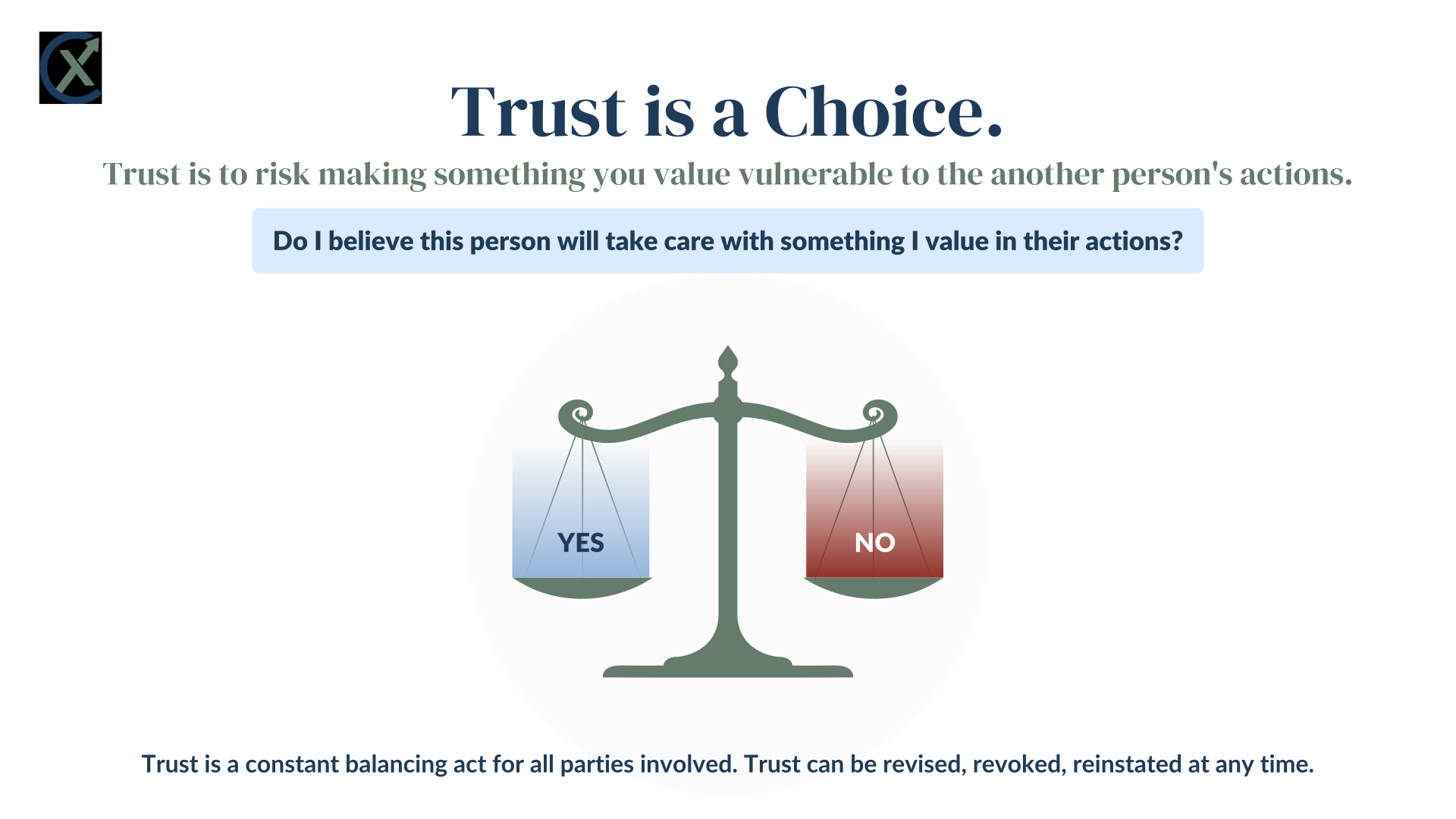
Have you used one of those Carvana Car Vending Machines? Maybe you’ve seen them: huge spirals of cars. Once you buy a car, you go to the machine, insert a custom coin that allows the machine to pick your car and bring it to the bay, and you drive away. If you don’t trust the giant car tower, Carvana will drop a car off at your front door for you. This is seriously different than how we bought cars in the past. Gone are the days of the sleazy used car salesman trying to strong-arm you into buying a lemon. No more waiting in the dealership while their finance guy tries to sneak add-on after add-on past you. Obviously, car vending machines and door-to-door service are an improvement. But how did Carvana get so big, so fast? They exploited a lack of trust in the market. No matter who you are or what you’re buying, trust is everything. Why is trust important? Because people want to believe in what they’re buying. If a CX leader spends hundreds of thousands of dollars on a new contact center solution, they want to trust that it will do what it’s supposed to do. IT buyers need to trust that they can defend their decisions. They don’t buy something unless you trust that it’s going to help you meet your needs. IT leaders are foregoing traditional sales reps and turning to self-serve buying practices. This is because, like car salesman, there’s a lack of trust when it comes to sales reps. Unfortunately, though, no matter how much of your own research you do, there will always be a point where you need to start interacting with potential vendors. And that’s where a lack of trust can completely halt your buying process. What causes a lack of trust? There are a lot of ways that trust can disappear. Here are some of the most common ones that we see: Lack of understanding: If you’re not sure about what you’re buying, you’re not going to trust it will do what you need. A product that doesn’t fit: If you don’t believe a product meets your needs, you’re not going to put your trust in it, no matter how much a salesperson pushes. Lack of action: If a buyer doesn’t feel like a seller cares about them, they’re not going to trust that the seller understands their needs. Too much action: Conversely, if a seller is too pushy, that desperation ruins any trust built up in the buying process. An attempt to build up leverage in the buying process: Playing your cards close to your chest can sometimes help you get leverage when buying tech. But it can also cause the other party to stop trusting you. The confidence gap: When there’s a lack of communication between two parties, the possible misunderstandings between them grow. And when that misunderstanding grows, trust shrinks. What the heck is the confidence gap? And how do I close it? There’s trust in a product and trust in a person. Traditionally, salespeople work to build trust in a product. They use demos to show off new features and functionality, tout any new integrations, and share case studies proving the sturdiness of their specific product. Focusing entirely on the product ignores the person buying or selling it. A typical telco contract term is three years. That is a long time. When you buy a new solution, you’re not just buying a product. You’re buying a 3-year relationship with a team of people who will suddenly go from complete strangers to being vitally important to your team. You better trust them! How do you build trust? It’s not that easy. You can’t just walk into a meeting, follow 7 tips and tricks, and walk out with a new, trusting relationship. Still, here are a few principles that we’ve seen build trust: Time: Trust doesn’t develop overnight. Understand that it might take a while before a good relationship develops between you and any vendor. Focusing on the people, not the technology: By focusing on the people, you form a lasting relationship, one that is crucial to the buying process. People are more likely to buy from vendors that they trust aren’t trying to rip them off. Saying “No” every once in a while: Be honest about limitations. If something isn’t a fit, that’s okay. Be upfront about risks, limitations, and uncertainty. A third-party helps you build trust in both the product and the person. A technology partner’s job is to help you buy tech. A third-party can help you validate any concerns or uncertainty about a solution. They can help you design a technical solution that meets your business needs. That’s what a third-party does – you know that. So how can a third-party help build trust in a person? We view trust as the creation of alignment between us, our clients and the vendors. Trust is the only thing that matters when it comes to having confidence for a buyer not only when picking a vendor, but also to go back and advocate for a big project. It’s foundational. Decide what is your process to validate, assess and quantify trust. Often, it’s an emotional thing, but it needs to be objective.   Working with a good third-party partner is like having a human lie detector on your team. We are not vendor-agnostic; we are vendor-objective. This means we hold vendors accountable for their actions. If they don’t deliver, we call them out; if they overpromise, we keep them in check. All this ties back to the idea of trust = alignment. With the power of the channel behind them, third-party partners have knowledge of the products you’re buying and relationships with the teams you’re buying from. A third-party partner can make sure that your needs are being addressed, and that you’re understanding what the vendor is trying to sell you. At the same time, the third-party makes sure the vendor understands you. Navigating the Channel – How a Partner Helps You Buy Tech Better Vendors have an incentive to be honest with third-party channel partners. If they’re not honest, the third-party partner won’t work with them on future deals. Think of the third-party partner as an Honesty Speed Check on vendors. By working with a third-party partner, you’re able to immediately trust a vendor. No matter how you buy tech, you’ll always need to deal with a vendor at some point. Working with a third-party partner you trust means that you can trust in the solution you’re buying.

JRJoe Rice · July 6, 2022
CXponent Event Recap: Cloud & Shades

CXponent Event Recap: Cloud & Shades

We recently hosted Cloud & Shades, an event at the J Parker, a rooftop bar near historic Lincoln Park in Chicago, Illinois. If you missed it, well, we feel bad for you. It was a great way to network, connect with old friends, and make some new friends. Attendees were all part of the communication pillar of the tech stack where software, infrastructure, and services come together to deliver outstanding CX and Digital Employee Experience. Here are the highlights: A great intro mission statement from CXponent’s Joe Rice Learning about Evolve IP’s fantastic solution for Microsoft Teams Direct Routing Seeing how Airkit’s automation processes streamline business Dispatches from the cutting edge of CCaaS technology straight from the NICE CXOne team All attendees got to take home their favorite pair of Ray-Ban sunglasses courtesy of Sunglass Hut What’s coming up? We are already planning another multi-vendor event in September. Until then, we recommend signing up for Catalyst Club. Join Catalyst Club Catalyst Club is for anyone who is part of the communication pillar of their company’s IT. The communication pillar of the technology stack is where integrated software, infrastructure, and services come together to deliver exceptional Customer Experience (CX) and the Digital Employee Experience (DEX). The CX layer is built for external communication like customer service, sales, and account management. The DEX layer is internal collaboration and engagement. The security and infrastructure layer is required to deliver the same Digital Employee Experience remotely or in an office. Under the umbrella of education and empowerment, the purpose of the community is three-fold: Propel your career. Propel your project. Propel your company. Membership Perks: Member-led mentoring/coaching Members-only job listings  Expert-led discussions Industry-specific virtual and in-person events Early access to vendor-specific news, product & feature releases, and updates.  Sorry, No Vendors be admitted to the group.

JRJoe Rice · June 7, 2022
Buying Tech: It’s Like House Hunters But With Even More Requirements

Buying Tech: It’s Like House Hunters But With Even More Requirements

The best part of House Hunters is the fact that none of the couples come to the realtor with the same requirements for their new home. Never. One always wants to be in the city while the other in the country. One wants a large yard while the other wants nothing to do with yard work. One wants a fixer-upper while the other wants turnkey. The only thing they always agree on is crown molding. Every. Single. Time. It’s easy to laugh at these couples, but they underscore a big problem with the buying process: Getting people to agree on requirements for large purposes is really, really tough. Competing Voices The larger a corporate purchase is, the more people weigh in. And cloud-based telco and CX purchases can be gigantic undertakings for your company. This means that people from Finance, Operations, IT, and Security might all be a part of the buying committee. Every person on a buying committee brings a new list of what they value and what they need out of a new solution. If we continue with the House Hunters analogy, each new person is bringing a new checklist of what they want from their dream house. Sometimes, this isn’t a problem! When everyone is aligned on what you need, you’re able to buy with confidence, and make a lot of people happy. But when your team isn’t aligned, it can get messy. What causes a lack of alignment when building requirements? Too many competing interests: Different teams want different things. Operations might want the best CCaaS tech to keep employees happy. Security might insist that security trumps all. Finance might tell the others that whatever they want, it’s too expensive. Lack of leadership on the buying committee: When there isn’t a clear leader taking charge, different people pull in different directions. Having someone to document, validate, and prioritize requirements is key. Unclear what problem you’re trying to solve: If you haven’t defined the problem you’re trying to solve, you’re not going to know what to buy. A lack of preparation in the previous stages of the buying process leads to a lack of alignment when it comes time to actually articulate your new solution.  Lack of technical understanding: If teams don’t understand the technology they’re buying, then they don’t understand what it can do. When people don’t understand the function of a new solution, they can start adding requirements that don’t fit the technology.  Confusing vendor reps: You may be clear on what you want. But vendor reps may try to bundle in new products, sell you on new functionality, or share confusing cost models. This vendor-created confusion leads to a lack of alignment when designing your solution. Unclear buying process: Who really needs to sign off on a purchase? How many times do different directors need to review technical designs? When does procurement need to get involved? Do they need to get involved at all? If you’re uncertain about what needs to happen when you buy new tech, it can lead to you overvaluing or undervaluing the wrong opinions. A Third Party can be your Real Estate Agent. No matter how conflicting their requirements, the people on House Hunters always find a home that they love and that works for them. And they do that with the help of their real estate agent, someone who’s had to deal with this exact problem a dozen times before. Which might mean that the real estate agent will include an option that seems to be out of left field, and that’s the one the couple goes for. A good agent knows how to balance conflicting requirements, validating the good and filtering out the bad. A third party like CXponent is like your real estate agent. We help you validate the right requirements for your company and turn those requirements into technical solutions. We listen to your requirements, we identify the problems that need to be solved and we present you with the best options. Sometimes you think you know what you need, but after we come in and assess the situation from the outside looking in, we might show you options that we see as best fit that may not match your original criteria. We add clarity to the buying process: If you’re uncertain what to do next, we can share insight and best practices to make sure you don’t miss any crucial steps. We act as your advocate to the vendors: If you’re feeling uncertainty or like you’re being pushed into something, we make sure the vendor is acting in good faith.  We can tell you which requirements are realistic, and which ones aren’t: Some requirements make sense. Others don’t fit the solution you’re shopping for or are just plain unrealistic. We use your expertise to help you spot the difference. We understand the technology: We’ve done this before. It’s our job to know the ins and outs of cutting-edge IT solutions. Turning your requirements into tangible solutions is what we do.

JRJoe Rice · May 11, 2022
Navigating the Channel – How a Partner Helps You Buy Tech Better

Navigating the Channel – How a Partner Helps You Buy Tech Better

There are thousands upon thousands of technology vendors vying for your attention, with more companies hitting the market every month. It’s a huge vendor ecosystem and trying to find the right vendor can feel like trying to navigate the ocean. This is why technology transformation projects can feel so overwhelming – you need to find your way from one port to another, all the way across entire oceans of vendors. Even if you are the Ferdinand Magellan of IT, it’s still a lot of work. What advice do we have to make your nautical network navigation faster? It’s simple – use the channel. The channel helps you cut through the waves and waves of different tech vendors, taking you on the most direct path from one IT solution to another. When you use the channel, you still get to work and contract directly with your vendors, but you also get the support of a channel partner who guides you along your tech purchasing voyage through the vendor relationship. We know you’ve got questions – after Ever Given blocked the Suez Canal in 2021, sea channels might not seem like the best analogy to use. But trust us, the channel will change the way you buy tech. What is the channel? The channel is a way for you to indirectly buy technology, a bulwark protecting you from the waves of direct sales reps crashing against your company. When you buy through the channel, you still buy market-leading solutions, and you still choose a vendor with whom you’ll have a healthy and growing relationship. But rather than going directly to these vendors, you work with a channel partner who guides you along your tech purchasing voyage. How do I use the channel to purchase tech? To put it simply: You work with a channel partner. Think of the channel partner as a tugboat, helping to safely guide you to your destination. These channel partners have agreements with thousands of vendors and help you match your requirements to the right solution. Most channel partners work with Technology Solution Brokerages (TSB), which helps make sure that the vendor agreements are on the same level. If the channel partner is a tugboat, then the TSB is the Merchant Marines. When purchasing tech through the channel, you share your requirements, goals, and concerns with your partner. This partner finds potential vendors that fit your criteria and helps you narrow down your choices until you’ve made the best selection for you. The channel partner works with both vendor sales reps and special vendor resources known as Channel Managers. These channel managers make sure that your company gets extra advocacy. How does the channel actually help me? There are a lot of advantages to using the channel. Some of the most prominent include: Cover weaknesses: A skilled channel partner shores up any weaknesses in your team. Vendor enlightenment: Channel partners spend their entire waking day learning about. different technology vendors. They know the strengths and weaknesses of all the market-leading providers. Client advocate: A channel partner can use both the TSB and the Channel Manager to advocate for your team. When there’s a problem on the vendor side, the channel partners can quickly escalate and add pressure to make sure the problem is solved immediately. Technical expertise: you know your company’s existing IT ecosystem. But a channel partner knows how market-leading, new solutions work. Save time: Stop wasting precious resources on vendor research. Stop wasting time dealing with pushy direct sales reps. Get unstuck: experienced channel partners have led dozens of buying projects. They can get your project un-stuck, like the tugboats that helped free Ever Given. Future state planning: A channel partner can help you great a map to navigate from your current state to your desired future state. Financial knowledge: Get clarity on vendor cost models and compare different cost models with your current state costs. This sounds great, but it’s probably really expensive. We promise you – it’s not. Then how do channel partners make their money? When you buy through the channel, the vendor pays the partner. Not you. The channel agreements between vendor and partner ensure that partner gets paid, and you don’t get stuck with the bill. Think about it. You get a partner who lives and breathes cloud technology. You get to ask them for help in whatever you need. And their vendor agreements mean they are incentivized to help you choose the best solution available for your company. All of this. And the vendor pays for it. What does my Journey in the Channel look like? Shipping out: First, you need a desire to purchase new technology. This might mean your boss is demanding you to migrate to Cloud. It might mean you’ve heard some cool tools like Conversational Analytics or Automation. Regardless, you need a reason to start your journey. 2. Lost at sea: Somewhere along your purchasing project, you hit a blocker. This might mean you’re totally overwhelmed by the number of vendors available. It might mean that can’t figure out how the new tech will integrate into your ecosystem. You’re in the doldrums of the buying process. 3. Into the channel: Wherever you’re at in the buying process, your channel partner meets you there. They help you solve problems and get the project moving once again. Some channel partners run you through the process that works best for them. The good channel partners work with you to accelerate your own process. 4. Safe at port: By teaming up with a channel partner, you’re able to quickly find the solution that works best for you. They help guide you through the vendor selection process and work with you to validate the new solution. 5. New Horizons: When you find a channel partner you trust, you give yourself a secret weapon in your back pocket. Any time you need to purchase new technology, you have a trusted advisor, ready to help with whatever you need. Some Common Objections to the Channel, and Why They’re Wrong It’s expensive. Did you not just read a few paragraphs above here? The channel agreements mean that the cost of the partner is paid for by the vendor. 2. Channel partners are biased. That’s not true. The way the channel ecosystem is set up, channel partners are incentivized to forge as many vendor relationships as possible and do not hold allegiance to just one vendor. 3. My needs and wants won’t be heard. A good channel partner is just that – a partner. They want to help you find a solution. That means listening to your problems and then solving them. 4. It’s confusing. Maybe I’ll just work with a direct rep. Any channel partners worth their salt will make the process as easy to understand as possible. If you have questions, just ask. 5. My existing vendor said they won’t be able to give me a deal if I use the channel. First, that’s likely a bluff from a salesperson who’s scared of losing a deal. Second, a channel partner can still provide technical expertise and solution validation services even if you’re thinking of sticking with the same vendor. Time to set sail! When it comes to buying tech, it can be difficult to keep your head above water. With so many vendors and solutions, it’s difficult to know where to start looking. By buying tech through the channel, you can be confident that your company is taking the fastest and safest route through rough water. At CXponent, we have years of experience working in the channel, and we’ve seen how it can truly transform a company. We’d love to hear about your experiences using the channel to buy tech. Fill out our survey below! Take me to the survey!

JRJoe Rice · April 29, 2022
Blockers of Change: What kind of organization are you?

Blockers of Change: What kind of organization are you?

Change is hard, so getting to the root of the problem of why you aren’t making progress is key. Take our quiz and find out what kind of blockers of change your organization is dealing with. 1. Your employees tend to: A. Have good ideasB. Work well togetherC. Work independentlyD. Have a lot of energy 2. Projects at your organization: A. Grossly underestimated in scopeB. Lack key roles to manage the projectC. Fail in choreographyD. Have no purpose or direction  3. Innovation: A. Doesn’t spread across the organizationB. Doesn’t happen/gets stalled oftenC. Happens too oftenD. Is reactive, not proactive 4. Success is thanks to: A. Historic successB. Everyone working towards the same goalC. An action-oriented team that delivers resultsD. A go-go-go attitude 5. Would you say your team is aligned? A. NoB. YesC. Is that even possible?D. At times 6. Does your team have the capacity for change? A. No, we always bite off more than we can chewB. No, there are never enough people to execute tasksC. Yes, but we keep having to pivot to new thingsD. Yes, but we keep adding more to our plate tooWhat would be your company theme song? 7. What would be your company theme song? A. “Stuck in the Middle with You” by Stealers Wheel B. “Happy Together” by The TurtlesC. “Running” by No Doubt D. “I Still Haven’t Found What I am Looking For” by U2   Mostly A’s You’re stuck and skeptical. On paper, everything should work perfectly, but when it comes to execution, it doesn’t. Most projects get stuck at the local level and it’s hard to gain momentum again.   Mostly B’s You’re aligned but constrained. Teamwork makes the dream work, but in your case your team can only do so much. You know what needs to get done and how it should get done but don’t have the bandwidth for more work. Mostly C’s You’re struggling to keep up. Everything is happening too fast, and you find yourself chasing to catch up. Innovation is key to keeping your company relevant and competitive but you’re always a step behind everyone else. Mostly D’s You’re in search of focus. It’s all hands on deck but there is no direction. Because of the lack of connection, your team is spinning its wheels and not going very far.

JRJoe Rice · April 20, 2022
Hurdles to Overcome When Buying New Tech and How a Partner Can Help

Hurdles to Overcome When Buying New Tech and How a Partner Can Help

First off, let’s note that no one just “buys IT”. That’s a laughable oversimplification. No one just walks into Best Buy and buys a new CCaaS solution after chatting to a Geek Squad member for 15 minutes.   If only it were that simple.   A corporate IT purchase is a process, one that involves many steps and even more people. In our experience, though, the big picture view shows us that there are roughly five stages that buying committees go through. It’s not a linear process, going from one stage to the next, culminating in a neatly finished, new IT solution. These stages are interconnected – info uncovered in one of the stages might cause you to review and revise stages you’ve already completed.   In these five main stages, there’s typically one big hurdle that causes most issues. These big hurdles are where a third party can really help.    Stage: Problem Identification   You have a problem. At first, you don’t know what the exact problem is, but you know something needs to be done to solve it.  Identifying this problem is just the tip of the iceberg. You see the tip looming out of the water, but you have no idea how deep it goes under the water. Is this a problem small, something easily solvable? Or is it big enough to sink the metaphorical Titanic?  At the beginning of your buying process, there’s excitement. Everyone knows about your iceberg problem, and everyone knows a change is needed. However, the problem is always bigger than anyone thinks. And just like a real iceberg, you can’t see just how big it is. IT ecosystems are all interdependent, and a problem with one solution could affect many others. As your original problem grows and grows in scope and seriousness, it can be demoralizing.  The biggest hurdle companies face in this stage lies in clearly articulating business problems and their technical solutions. CX leaders, C-Suite Execs, Network Admins – everyone is guessing on how deep the iceberg goes.  Stage: Solution Exploration   According to Forrester, there were roughly 150,000 B2B SaaS companies in the market. By 2023, they expect that number to hit 1,000,000.  Nearly 1,000,000 different companies, and somehow, you need to choose the right one for you and your company.  On top of that, Gartner research shows that on average, there are six members in a typical buying committee. Each of these members compiles information from an average of eight sources – online resources, expert opinions, personal and peer experiences – as they research solutions. That means when the average buying committee meets to discuss a purchase, they will have a minimum of 48 input sources to help them plan.  Gartner also found that 44% of millennials prefer a completely sales-rep-free environment when buying technology. Even before the pandemic, B2B buyers were already conducting over 80% of their research prior to engaging with a sales rep.   The biggest hurdle in this stage is a buying committee’s inability to understand the marketplace. The sheer number of SaaS companies and the disorganized self-serve research practices mean that many companies get overwhelmed by the number of potential vendors. And when they get overwhelmed, projects slow down or stop entirely.     Stage: Building Requirements   You think you know exactly what you want to buy. But then you start talking to vendors.   You start comparing your current state to different future states. Every stakeholder and business leader in your org has a different opinion about what’s best. Any research you do just makes the new solution more and more complicated.  Building requirements are always, and we mean ALWAYS, more labor-intensive and time-consuming than everyone thinks. You need to build alignment on more than just the technology – your company needs to be aligned on impacts, business goals, change management, and budgets.   Another overlooked piece of the Requirements stage: understanding what your employees want. The agents who use a CCaaS solution on a day-to-day basis may not be on the buying committee, but they have valuable insight into what works and what doesn’t. Taking the time to learn about how real people use your technology helps you build a better solution.   The biggest hurdle companies face in this stage is gathering all the data necessary to make a smart list of requirements. By failing here, people build requirements lists without truly understanding what they need.  Stage: Vendor Selection   You’ve designed your solution, sent out an RFP, and narrowed down your list of possible vendors.   You’re almost done!   Now you just need to:   validate the technical design options  compare and negotiate contracts  build an implementation plan  understand steady-state roles and responsibilities  navigate contract signatures   Easy enough, right?  The vendor selection stage is one giant hurdle in a process full of them. During the final vendor selection, there are a lot of moving parts. These moving parts can cause friction between you and your new vendor. If you don’t understand their process (Or vice versa), it can lead to a rocky start to your new technology.  Stage: Deployment and Adoption   This stage is like riding a bike up a hill, but the tires are flat, and the bike is on fire. You can get to the top of the hill! It’s just going to be painful and take longer than you anticipated.  The buying process doesn’t end at the contract signature – it’s not that easy. During the deployment, all your previous decisions and work are put to the test. Did you do your due diligence correctly? Did you pick the right vendor? Did you make a culture map? Did you make a strong enough implementation plan?  There are several hurdles to overcome in this stage.   Planning: Without a robust implementation plan, you’ll miss deadlines and face difficulty in hitting your milestones, meeting your projections, and getting your new solution off the ground.  Vendor Misalignment: If you and the vendor aren’t fully aligned on your project plan, critical tasks won’t get done. And even worse, resentment could start to grow between your company and your new technology partner. Issue Management: No implementation is perfect. How do you manage toward your goal when you’re putting out the inevitable fires that arise on any technical implementation? Task assignment and accountability: there are lots of simultaneous steps in this stage. Ensuring everyone has clear and detailed instructions as well as benchmarks to keep moving the project forward in a timely manner.  Adoption: Employees can be adverse and feel threatened by change because of the lack of communication from leadership about the new technology. If they had no say in the process, they will not understand the overall benefits and how the new technology might empower them. Change management planning is critical.  Transition to Steady State: Congrats, your new solution went live! But how do you address the host of open issues from the implementation? How do you make changes to your solution as your business needs to change? Who is responsible for what now that the implementation team has rolled off the project? What does the vendor do, and what are you responsible for on your own?  How Does a Third-Party Help?   Do you see all those problems we just listed? We’ve solved them before.   We’ve been involved at every stage of the buying process, helping clients clear hurdles. As a third party, we act to fill the gaps in your org chart, accentuating your strengths and shoring up your weaknesses.  The key takeaway: it’s never the wrong time to explore a third party.  What can CXponent do for me?  No matter where you are in the buying process, we can give you the information and expertise you need to buy with confidence. We work with you to develop a custom SOW that meets your needs, rather than sticking with you with a rigid template SOW. From the very beginnings of problem identification to the steady-state transition, we work with your team to help you clear all the hurdles on your way to a new IT purchase.  Sign Up for Our Newsletter

JRJoe Rice · March 29, 2022
Do Your Project Status Calls Suck? Here’s How You Can Fix That

Do Your Project Status Calls Suck? Here’s How You Can Fix That

That moment you look at your calendar and you see it. The dreaded “status call update” blocking out valuable time you could be focusing on executing the project instead. You’re annoyed about the call before even dialing in. We know project status calls tend to suck, but they don’t have to! Why do project status calls suck? If you have any experience in IT projects, you probably know what we’re talking about. Once a week, the whole team hops on a conference call. A PM shares an unreadable spreadsheet, and goes down a list of action items, checking boxes along the way: On track. Off track. On track. Whenever an issue comes up, someone says “I’m working on it.” Somehow, the meeting goes 10 minutes over. Everyone leaves, mildly more irritated than they were before the meeting started. How can we make these meetings better? Project status meetings don’t have to suck. When they’re productive, these meetings are a key component of any project. Here are a few tips to get the most out of your project status: Be prepared. Send out an agenda the day before the meeting. This helps everyone know what to expect and lets them reach out if they want to talk about something else. Send out notes and action items right after the meeting. Meeting summaries can seem so trivial. But if you put them off, you forget important info, you misremember certain items, and action items don’t get done in time. Sending project status summaries right after your meeting can skyrocket productivity. Don’t just list out issues – solve them. You have the entire project team on a call. Use that time to solve problems! If someone brings up an issue with an app integration, don’t just document the issue. See if someone on the call can help them take care of the problem. Otherwise, you might wait days or weeks before a problem is solved. Let your timeline guide the meeting. Rather than running down a checklist of action items, discuss the items that need to be completed for the next milestone. By focusing on your next goal, you see the forest instead of getting lost in the trees. Don’t be afraid to make quick decisions. If a key team member is gone, it can be easy to hold off on making big decisions. But use the time with your team to make decisions together. Trust your team. Make sure the vendor is aligned. The vendor may have a time-tested process that they’ve done for all their implementations. But they need to work with your team. If you find certain documentation or meeting structures work best for your team, don’t be afraid to tell the vendor. They’ll listen. What do you think? Did we leave out anything? We’d love to hear how you make your meetings as effective as possible. Let's Talk!

JRJoe Rice · March 2, 2022
Who Really Reads the Rules Before Playing a Board Game? Change Management Pros

Who Really Reads the Rules Before Playing a Board Game? Change Management Pros

During the pandemic, sales of board games and puzzles soared. Confronted with endless work from home, many people wanted a “digital detox” where they could spend time without screens. Some folks played board games with friends, others built LEGO alone or with family. Even Dungeons and Dragons had a record sales year, with people of all ages rolling dice in a fantasy world. Board games can be a lot of fun. But they’ve grown way more complex over the years. Gone are the days of Passing Go in Monopoly or amassing an army in RISK. Now instead, we have games like Scythe, which can only be described as a game where you amass resources to build an army and civilizations in a sort of steampunk 1920s Europe, fighting and trading with other players during simultaneous gameplay. Also, there are giant robots in it for some reason. (For the record, Scythe is a ton of fun.) Somewhere along the line, games grew so complex that understanding what you’re even supposed to do became a challenge. How do you even play the game, let alone win? This satirical news article sums it up perfectly: “Friend Group Meets Weekly For Board Game Rules Explanation Night.” These new, shiny, unceasingly complex board games have a lot in common with IT implementations. Sure, you know what you need to do – you need to win the game/install new technology. But getting there, that’s the tricky part. And just as board games have proliferated and grown more and more complex, tech solutions have also grown more and more complicated. Change management for an IT implementation is like learning the rules to a new board game: It’s confusing, it’s not fun, and it’s completely necessary if you ever want to win. And just like how the rules to a board game can be excruciating in their details, IT change management consists of many small details that you need to get right. It’s more than just creating a project timeline and holding weekly status meetings. An implementation requires work before, during, and after the technology is set up to ensure you get the most from your purchase. Common Implementation and Change Management Steps: Before Organizing project team members: This entails educating everyone involved in the implementation about their roles and responsibilities. If you’re planning on leveraging a network admin to test and turn up a new circuit, it’s good to let them know what’s coming down the pipeline. Agreeing on a timeline: This is more than just picking a date to implement your new technology. You need to work backward from the answer: when do we need to test integrations and new technology? How early do we need to schedule training? What network dependencies need to be completed before we can schedule a go-live? Articulating Risks: What are the biggest concerns and question marks facing your project? By describing the values and concerns of your company, you ensure that your future vendor understands what you really need. Describing dependencies: This crucial step entails making sure that your vendor partner understands your network ecosystem, specifically any dependencies that their technology will need to succeed. Creating a cost model: Before you even purchase new technology, your company needs to be ready to track cost savings in real-time. Having budget meetings to build cost trackers and models ensures you can understand where your money’s going during the project. Have you heard of a Culture map? During Tracking actions and resolving issues: A bad implementation meeting consists of people checking boxes that say “on track” or “off track.” A good implementation meeting consists of people flagging issues and solving them together in real-time. They also document these issues to make sure they learn and understand how to streamline the implementation process. Which one do you want – a good meeting or a bad meeting? Executive summaries: company leaders need to stay up to date on project status. How to report wins and explain problems to the leaders in your company? Document changes: Every change you make on your implementation journey needs to be documented and accounted for. Organize training: Make sure you know who’s leading training, who’s participating, and how they’re participating. Complete testing: Document the ways in which you’ve tested the new technology to demonstrate the validity of your new solution. Decommission old technology: Properly decommissioning old tech means you save money on ETFs/cancellation fees, and don’t pay for both the old and new solution. After Account management onboarding: Who will own the solution now that it’s implemented? Who are the vendor contacts to reach out to when you need escalation? QBRs: How often will you have QBRs? Who will participate? What information do you want to discuss in these meetings? Documentation archiving: The testing is done, the training’s complete, the solutions turned up. Now, where do all these changes and documents live in your system? How can someone access them if they need to review them? Steady-state maintenance: oftentimes, the people who use and manage the technology are different from the people who implemented it. Have you made sure that everyone is clear on their new roles and responsibilities? Cost model validation: Compare how much you budgeted with how much you actually spent. This will prove instructive on future projects, purchases, and implementations. Lessons Learned: What went well? What went completely haywire? What can you take from this implementation to others? Risk Review and Issue Log: What risks were avoided during the project? Which risks still need to be monitored? What issues are still open? Unfortunately, many people gloss over critical steps in the implementation process, which can change the trajectory of their entire project. It’s like how people ignore the actual rules of Monopoly, and usually end up playing a worse version of the game. Why do some teams cut corners during implementation? Organizational constraints: Some companies don’t have the time, budget, or team for a full-scale implementation. Lack of leadership: without a strong project manager, implementations can slowly slip into inertia. Confusion and lack of experience: There’s a lot of steps to juggle in an implementation! It’s natural that some steps might get ignored and some info might get lost. Vendor partners and internal PMO: These partners are supposed to make the implementation process easier. But they don’t always understand your requirements and risks. Overconfidence: Sometimes people feel like they know what’s best and ignore project management best practices. Good change management practices start before the project even begins. It’s a lot to keep track of. And you need to start the change management process before the contract is signed if you want a successful implementation. Regardless of your project management methodology, laying a strong foundation before the project begins pays dividends down the road. We’ve played this game before. No matter what technology you’re buying, we’ve read the rulebook and we can help clarify it for you. A good third party doesn’t railroad your project. Instead, they work with your internal team and PM resources to call out risks, helping you identify needs and solve problems. A good third party helps you schedule meetings you didn’t even know you needed so you can address issues before they become urgent. As an end-to-end partner, CXponent can provide value at any stage of a project. We can validate a program plan before it gets started or use our experience to help you build one. If you start the project, but feel you don’t understand the rules, we can come in and help clarify for you. Documentation can be a cheat sheet to clarify the rules. Clear documentation is key in change management. Some of the documentation needed includes: Action items Risk registry Issue tracker Cost models Project summaries Meeting notes and archives Training materials Network diagrams Test and turn up checklist Change Management register Your company might have some templates for this. But sometimes managing documentation can feel just as overwhelming as the new technology itself. A third party can take care of the details and documents, allowing you to focus on the big picture, and play to win the game. Still feeling overwhelmed? That’s understandable. There’s a lot to consider when it comes to implementations and change management. It can feel like the game is rigged against you and the rulebook is incomprehensible. But we’ve played the game, and we can help you win. No SOW needed – we’re happy to chat with you about how we manage projects, the documentation we use, and common pitfalls we’ve seen. Let's Chat!

JRJoe Rice · February 28, 2022
What The Heck is Confidence Gap and What Can You Do to Close It?

What The Heck is Confidence Gap and What Can You Do to Close It?

In Return of the Jedi, no one in the Rebel Alliance is sure if the (new) Death Star actually works. They’re not sure of how far along the Empire is on the construction of the superweapon. They also don’t know what it’s capable of. The rebels hold a meeting where they discuss what to do – they assume the Death Star is inactive and build a plan of attack around this (erroneous) fact. Of course, they get caught by this “fully operational” Death Star, leading to one of the greatest lines ever uttered by an alien lobsterman in cinema history: The rebels’ mistake is instructive in two key ways: 1. The old Star Wars films really hold up. Not to be a snob about it, but even Return of the Jedi is untouchable – especially compared to the mess of the most recent movies. We said, what we said. Schedule a call with one of us and change our mind.   2. The Rebel Alliance should have done more research to close what we call “the confidence gap.” The confidence gap is a common issue when buying technology. What is it? Simple – the confidence gap is the difference between a buyer’s expectations and a vendor’s understanding. A confidence gap exists when the buying committee is unsure of whether a vendor truly understands their requirements and goals. Think of it as two people, talking past each other about separate (but related) topics. The larger the difference in topic, the greater the drop in confidence and the greater the increase in frustration. Sometimes, buying committees press on through the confidence gap, ignoring their uncertainty and purchasing technology anyway. Sometimes, the confidence gap is too great to bridge, halting buying projects in their tracks until all can be sorted. What can cause the confidence gap? The gap can be widened from both the buyers’ side as well as the vendors’ side, Buyers: Tunnel vision: sometimes buyers want to work with trusted companies they’ve worked with in the past. Sometimes they have a friend at a vendor or want to implement a certain technology no matter what. Inertia: Sometimes it’s easier to stick with your incumbent providers. Sure, there’s a lot of good CCaaS tech out there, but maybe it’s easier on everyone to just stick with your old vendor. They might be able to get you what you want. Lack of technical expertise: If a client doesn’t understand the technology they’re buying, they can’t understand how it will truly impact their business. Over-emphasis on cost: In the drive for cost savings, executives can sometimes carve out key pieces of a technical solution without understanding the ramifications of their actions. Lack of alignment: When your buying committee isn’t clear on goals, you lose focus on what you need out of a technology. This lack of focus means that some people might just nod along in agreement while others start to lose confidence that the technical solution being considered is the right fit. Lack of leadership: Without a clear leader on a buying committee, it’s easy to lose sight of the goal. Vendors, online research, third party content – all of this can confuse and slow down a buying committee. People lose confidence that they’re buying what they need, and as project momentum slows, people’s confidence slowly decreases as well. Vendors: Impatience: In the pursuit of a deal, a vendor can sometimes become sycophants – yes, we can do that. Sure – whatever you say. Yeah – our SEs will work it out later. This can lead to the salesperson ignoring your needs in order to get a signature. Overconfidence: Salespeople believe in their product. That’s good! But sometimes that leads them to believe their product can do anything you want it to. That’s bad. Not every product is right for every customer. Lack of technical expertise: Large enterprise network projects are confusing. Cloud-based software migrations are daunting. Software integrations can be frustratingly fickle. In the same way that your buying committee might not understand a product, the salesperson might not understand your existing network ecosystem. Lack of context: You might know that your company values security above all else. But how does a salesperson know this? They don’t. Sometimes, core requirements go unsaid, and serve to hobble a project just before the contract is signed. Confusing cost models: Vendors bill their products differently. To a salesperson, these fees might make perfect sense. But to you, these costs might make your head spin. Lack of listening: In order to meet your requirements, a vendor needs to listen to your requirements, and show you a technology that will best serve your needs. Sometimes, though, vendors are excited about a shiny new solution they want to show off. Other times, they hear what you want, but think you should really focus on something else that’s more valuable. By failing to truly hear a client, they fail to provide a solution that truly meets the needs of the client. The confidence gap exists when there’s a misalignment between a buyer’s goals and a vendor’s understanding of those goals. What happens if the confidence gap is left unaddressed? Purchases stall. If a buyer loses confidence, they halt the buying process until they feel comfortable. Unfortunately, this can sometimes cause the vendor to push harder and double down, only making the confidence gap even greater. Projects are canceled. If the confidence gap can’t get cleared, companies sometimes think it’s safer to stick with the status quo instead of jumping into an unknown future. Companies invest in the wrong solution. If a company plows ahead with a purchase and doesn’t close the confidence gap, they risk purchasing a solution that doesn’t fit their needs. Their goals are left unmet, people are left unhappy, and the frustration can lead to negative outcomes for everyone involved. See: How to Qualify if Someone is Trustworthy in Business? (Especially in the Sales Cycle) How do you fix the confidence gap? There’s no easy fix to overcoming a confidence gap. If it were easy, we probably wouldn’t be writing this blog post, every technology project would go smoothly, and the rebels wouldn’t have lost a valuable starship in the Battle of Endor. There are a few key ways to minimize the confidence gap, and make everyone feel confident about their purchase: Buyers: Gain alignment before the buying project starts. It’s time-consuming to create a project charter that documents goals, risks, roles, and requirements. But building this alignment means that you won’t start getting conflicting feelings when you’re narrowed down between two vendors and suddenly start second-guessing yourself. Market research. Make sure you’re considering all options before you hitch your wagon to a horse you’re unsure of. This might mean considering solutions or vendors you’re unfamiliar with. Customer referrals and interviews. before buying technology, be sure to reach out to a vendor’s referral customers. Make sure to ask them about any customization they needed, and how well the vendor worked with them to meet their needs. Vendors: Talk less, listen more. It’s easy to fall into the trap of wanting to show off your shiny new functionality. But by taking a second to stop and listen to the client’s true goals, you can also gain insight into the risks and interdependencies they have. Bring in the technology experts early. If you feel unsure about a client’s requirements, including integrations to existing technology, that’s okay. Just take a step back and bring in a sales engineer or solutions architect who can clarify everything. If you’re uncertain, chances are that you’re not the only one. You’ll look smart for bringing in the right people. How can a Third Party help? It doesn’t matter if you’ve just started looking for a new product, or if you’re in contract negotiations – the confidence gap can appear and grow in any stage of the buying process. At CXponent, we’ve been seen the confidence gap grow and shrink in real-time. We know how to help bridge the gap wherever you encounter it. What CXponent can do: Translate business goals into technical requirements. By serving as an intermediary, we help clients articulate what they want out of a technology. Our experience and expertise mean we can validate that these goals are actually met by what a vendor proposes. Clarify confusing cost models. our cost analysis tools allow clients to compare current state costs with projected future costs, no matter how different these cost models may be. Build alignment on a buying committee. If it’s a lack of confidence, a lack of leadership, or a lack of understanding, we meet your team where they’re at, giving your team the tools they need to purchase with confidence. We don’t commandeer your committee, but instead empower the team, augmenting your existing committee to offset any weaknesses. Solution validation. Unsure of whether or not a vendor solution meets your goals? We can use our technical expertise to make sure your goals will truly be met. Planning for the future. If the prospect of a migration or implementation seems daunting, we help clarify it, making sure you have the team and timeline in place to successfully use whatever you’ve purchased. Buy with confidence IT buying projects don’t have to be daunting. It might feel like you’re staring down a Death Star trench run (with your targeting computer turned off). But there are some easy tricks you can do to get everyone on the same page, and make sure vendors and buyers aren’t talking past each other. And sometimes, a third party can give you the tools you need to buy with confidence. Have questions about how to minimize the confidence gap at your company? Let's Chat

JRJoe Rice · February 28, 2022
DDoS Attack Anxiety: Is Your Infrastructure Ready to Handle Something This Big?

DDoS Attack Anxiety: Is Your Infrastructure Ready to Handle Something This Big?

Picture it: Sicily 1912.  Just kidding. But we will be channeling our inner Sophia Petrillo from Golden Girls to set the scene.   Picture it: The world 2022. Your website is down and your customers can’t get the answers they are looking for. You finally pinpoint the issue and find out it was…a DDoS attack.   DDoS stands for distributed denial of service. If you’re not familiar with DDoS attacks, they are both simple and devastating. There are three types of attacks.   Volume = they flood your bandwidth.   Protocol = they flood your server resources.   Application layer = they flood your software.  By flooding, Hackers try to overwhelm your network with a ridiculous number of requests. If your website is busy trying to handle millions of spam requests from hackers, that means that well-meaning customers can’t visit.  DDoS attacks have been around since 1999, have hit everyone from Sony to US Bank and could happen to anyone – even the cute, little coffee shop down the street.  Thanks to smartphones and the pandemic, more than ever, your company’s website is like a front lobby for your customers. Customers aren’t going into stores or meeting in your offices. They’re walking through the front door of your website for whatever they need.  So, if your website goes down, it would be like walling off your door and locking all your customers out.   This is what happens during a DDoS attack – your critical web services are incapacitated, and customers can’t get what they need.  To a customer, a DDoS attack can be a mere inconvenience. To a company, a DDoS attack can be catastrophic. These attacks do more than just incapacitate websites, DDoS attacks can lead to:  Loss of revenue and customers.  Damage to your company’s reputation.  Unnecessary time and expense spent bringing your site back online.  A halting of business-critical, web-based applications and processes.  The exploitation of network vulnerabilities by DDoS hackers.  The bad news is that DDoS attacks aren’t going away – they’re growing more prevalent. In the second half of 2021, they recorded record-breaking numbers both HTTP DDoS attacks and network layer attacks. In addition, there has been a rise in ransom DDoS attacks. In Q4 of 2021, ransom DDoS attacks rose by 175% from the previous quarter and 29% from the previous year. In these devious attacks, hackers demand money from their victims to stop the DDoS attack or threaten future attacks if the money is not provided.  It’s clear that these attacks aren’t going anywhere, and they’re growing more and more sophisticated. This means that the infrastructure and security measures that served you in the past may not be able to stop a DDoS attack today. A recent botnet used by hackers can send 17.2 million requests to a website per second. Can your infrastructure handle something this big?  Sign Up For Our Newsletter

JRJoe Rice · January 21, 2022
Mapping the Journey: Navigating IT Change Management

Mapping the Journey: Navigating IT Change Management

Planning an IT implementation is like planning a family vacation: it’s complex and requires attention to detail. While everyone shares the same end goal (relaxing on the beach or launching a new cloud-based CCaaS solution), there’s a lot to consider after choosing your destination (Jackson Hole, San Diego, or IT security software).   Once you've selected a new IT application, the real work begins. The more stakeholders involved, the more details to manage. A clear, comprehensive plan is essential to ensure everyone’s needs are met, and without one, it’s easy to get stuck in indecision. In our experience, companies often focus heavily on selecting the right technology but underestimate the importance of a well-structured implementation. Choosing the solution is exciting, but without proper change management, implementation can quickly turn into a headache. Start Implementation Planning Early Implementation planning should begin well before finalizing a technology purchase. As soon as you narrow down the vendor options, it’s time to start preparing for change management. Key considerations include: Timeline: Are there firm deadlines? What’s a realistic timeframe for implementation? Testing: Who will oversee and approve user acceptance testing (UAT)? Training: Will training be in-person or remote? Who will manage and confirm training sessions? Decommissioning: Who handles decommissioning old technology? When’s the best time to transition for cost savings and minimal fees? Go-Live Strategy: Will the new solution launch all at once or in stages? Project Team: Who’s responsible on both the vendor and company sides? Is everyone aligned on requirements and technical aspects? Financials: How will you track costs and savings? Who validates the financial outcomes to support your business case? Get the Right Project Manager A great project manager is like a skilled travel agent—they know how to plan the route and ensure a smooth journey. When assembling your project management team, consider: Experience: Has the project manager overseen similar implementations? Capacity: Can they dedicate enough time each week to meet the project’s demands? Knowledge: Do they understand the technical intricacies and interdependencies of the solution? Your IT Journey Starts Here At CXponent, we’ve successfully managed implementations from small, custom solutions to large-scale global network overhauls. Our team will guide you through every step of your technology journey, spotting challenges before they arise and ensuring a smooth ride.

JRJoe Rice · January 14, 2022
Top Five Best Practices for Replacing Your Phone Systems with Microsoft Teams

Top Five Best Practices for Replacing Your Phone Systems with Microsoft Teams

Top Five Best Practices For Replacing Your Phone Systems with Microsoft Teams  If you haven’t moved to a cloud-based Unified Communications system, we have one question for you – why not? Remote work is growing more common and companies need to adapt. Additionally, employees now expect the flexibility and cohesiveness offered by UCaaS solutions, with functions such as integrated calendars, click-to-call, and presence all being required for a modern workforce.  We get it – migrations can be expensive, complex, or both. Phone systems are also delicate solutions that can cause a lot of pain if they’re messed up. But the longer you push off a phone system migration, the more you lose.  Most companies are already using a next-gen phone solution, even if they don’t know it: Microsoft Teams. Utilizing Teams can be a way to cut down on the confusion and uncertainty that comes with a UCaaS migration. But a Teams migration is not without its own challenges. In this blog post, we explore the key factors to consider when investing in cloud-based collaboration and contact center platforms for your organization.  1. Gain consensus on requirements internally before vendors set them for you.  Teams does a lot more than just deliver voice to end users. You need to gain internal consensus on what you want the tool to actually do. A lack of alignment can lead to competing stakeholder interests. If the IT department is focused on a 1-to-1 replacement of existing technology, and the business units are focused on new functionality, it can lead to conflicts that will prevent you from ever moving to a new platform. It’s essential to involve all relevant stakeholders in the decision-making process from the beginning. That way, you can…  2. Align stakeholder interests with technical architecture and requirements (independent of vendors). Once you’ve decided on your business goals, translate them into technical architecture. Make sure your team can support the functionality desired by the business. Document any weak spots, question marks, or unknowns before you talk to Vendors. That way, you steer the conversation when talking to service providers. Don’t let them sell you a solution that doesn’t work for your team. And if you find your team is uncertain about a lot of the technical details, that just means you need to find a more comprehensive provider.  3. Maintain financial responsibility throughout the buying process.  This sounds like common sense, but there’s a lot of work that goes into maintaining financial responsibility when you’re buying tech. During the planning stage, take the time to document the TCO of your current solution. This helps you build a better business case for a new solution. During the buying process, make sure the vendor understands every one of your requirements, both functional and technical. This helps you eliminate hidden costs and features and gets you the best price. And when considering price, be sure to think about the cost of implementing your new solution so you…  4. Don’t skimp on reducing implementation risk.  Even if your company is already using Microsoft Teams, that doesn’t mean the implementation will be easy. Migrating from one phone system to another is always arduous, no matter what solution you’re moving to. Make sure the vendor details their implementation support during the buying process, and begin documenting an implementation plan even before the contract is signed. A technical solution is only as good as the people who set it up. And implementation is more than just porting numbers. It includes training, testing, documenting changes, and managing hardware changes. Making sure the implementation goes well means that all your end users will have a great experience. Which leads into…  5. Be clear on the future operating model – roles, responsibilities, and expectations.  Migrating to Teams will change the way your organization operates. Don’t wait until the go-live to figure out how. Be clear on the roles and responsibilities of your new solution before you purchase it. What do you want the vendor to manage? What do you want your team to be in charge of? How will end-users report issues, and who will respond to them? No matter the size of your implementation, document the future state, and make sure that anyone involved in managing the day-to-day operations of the phone systems understands their new role.  Read more on how to Create a Decision Process that is Buyer Centric Sign Up For Our Newsletter

JRJoe Rice · January 3, 2022
The Problem with Self-Serve Only Purchasing Practices

The Problem with Self-Serve Only Purchasing Practices

According to Gartner, 44% of millennials – who now make up the largest demographic in the workforce, prefer a completely sales-rep-free environment when buying technology. Even before the pandemic, B2B buyers were already conducting over 80% of their research prior to engaging with a sales rep is a trend that has been accelerated by the pandemic as well. Work from anywhere, self-serve research before purchasing, and contactless buying journeys have all been sped up due to current circumstances.    In the past, it was industry standard for salespeople to build trust and relationships by meeting with a potential client face-to-face, wining and dining them from early in the buying process until the deal was closed. Now, the norm is the complete opposite: buyers want to research on their own further into the purchasing process before they engage with vendors directly. They want to take time to figure out exactly what their issue is and the best way to solve it. In the Avoiding the Sales Kill Box episode of the Rattle and Pedal: A B2B Marketing Podcast Maria Boulden, Gartner’s CSO Whisperer, said that the average business leader checks eight different sources before making a purchase decision. Self-serve education may seem like a smart way to buy technology without getting swayed by salespeople. But these purchases aren’t made in a vacuum by one person. Today’s complex technology purchases often have no less than six different key stakeholders come together, each with different business priorities, research, findings, and opinions. That means, at least 48 different input sources are presented in a Buying Committee meeting. It’s difficult to build consensus when everyone has to their own conclusion in a research silo.  What does self-serve education really mean for buying committees? Chaos.   Do you remember a time when someone else’s opinion completely derailed a decision you made? It’s like when you go to a restaurant: you are excited to try a chicken sandwich. Then, someone at the table tells you about how the last chicken sandwich they ate was disgusting (even though it wasn’t even from the same restaurant!). Someone else chimes in about how they heard from a friend that the fish is good here. You don’t really like fish, but now you find yourself looking at the menu again for an alternative.   What about a time when you were overwhelmed when given too many options for something? Let’s go back to that restaurant again. Do you typically make the best decision on what to eat when the menu is one page long, or when the menu is the size of a Russian novel? (I’m looking at you, Cheesecake Factory.)  A typical enterprise buying process is as follows:  A business problem is identified.  A group of people is tasked with solving the problem.  The group sorts through online resources, personal and peer experiences, and expert opinions to set their requirements in order to find a solution.  The new solution is compared to the current state.  The solution is refined.  Pricing is negotiated between multiple teams, such as IT, business unit leads, procurement, and the new vendors.  The new solution is implemented and monitored to validate the purchase decision.  These steps aren’t linear or serial, and it’s difficult to know the downstream technical and operating interdependencies that come from prioritizing the wrong part of “the solution”. The road to a successful on-prem to cloud deployment is littered with “lift and shift” intentions. And if you circle back to challenge assumptions too late, you risk disrupting the momentum the team worked hard to get.   When buying committees self-serve, this is exactly what happens. To add to the mess, Forrester estimates there will be 1 MILLION SaaS companies by 2030, up from the current ~150K. Imagine how hard it is to try to review all of this information and compare it to way too many options while dealing with no alignment and consistent doubt on previous decisions.  Confidence is lost, projects are stalled, and complex solutions that can solve a large problem are being dissected into smaller purchases that limit the business benefit of the purchase in the first place.  Wouldn’t it be nice to have someone who is completely agnostic but knows the industry well come in a sort through the chaos?   Am I about to go back to the restaurant scenario? You bet!   Whether the menu is small or large, how many times have you found yourself unable to decide between a few different entrees? You can indecisively waffle between options all you want. But if you ask the server for their recommendation? Since they know the menu, they can help narrow down your choices, and typically give you a few (delicious) options.   Working with a technology advisor is like asking a server what they recommend. Just like the server, the advisor wants what’s best for you and your experience. Just so you know, one in four tech buyers who refuse to work with a seller has buyer’s remorse. One in four!  So how does an advisor build alignment?  There are four key areas that are crucial to building alignment:  1. Business Drivers  While there are many reasons to undertake a technology transformation project, these reasons can typically fall under two categories. Either stakeholder is looking to buy a solution to solve an internal issue like cybersecurity risk, operating complexity, or a talent shortage. Other times, stakeholders want to use technology to achieve a competitive advantage in their industry, like increasing loyalty through a better Customer Experience. Whatever the drivers may be, team members need to make sure they’re working toward the same goal.  2. Economic Impact  When it comes to the total cost of ownership, teams should not only consider licenses and monthly fees, but also potential savings such as decommissioning on-premises servers or reduced time for on-boarding and training. There are costs involved with training, implementation, and maintenance of new technologies. Infrastructure like Network circuits and other auxiliary hardware can impact financials as well. Everyone wants to save money when purchasing a new solution. But understanding the economic impact of a project can be perplexing, especially when there is an expected business impact and budgets are changing departments (phone system = IT Expense, but CCaaS and CX software = Business expense).    3. Change Management  Some people think choosing what solution to purchase is the hard part. But the implementation of new technology is crucial for realizing the benefits of any new purchase. Applications need to be configured and integrated with business input. People need to be trained. Old technology needs to be decommissioned. New technology needs to be introduced in the most effective way possible. Oftentimes, these implementations involve new teams for both the buyer and the seller. Building consensus on the implementation and change management of a new technology is crucial for that technology’s success.   4. Operating Model  Large-scale technology transformations involve a huge amount of organizational change. What will the company look like after the new purchase is installed? Who’s responsible for the administration and support of the solution? Who will use it on a regular basis? How do they feel about this new solution? On the vendor side, what support will be offered once the technology is up and running? Failing to build alignment around these questions during the buying process can have catastrophic effects on the fate of a project.  This sounds difficult to manage.  It's true, it isn’t easy to build consensus among different teams. Internal politics and processes can make reaching alignment a tricky process. When you add in the chaos of sorting through the digital marketplace, it’s a wonder any projects get done at all. We find that many cloud technology purchases can take anywhere from nine to 18 months from beginning to end. Packaged applications and Infrastructure are especially difficult. The complexity of these solutions requires significant planning and implementing them into an existing IT environment can be a delicate and laborious process. Real-time applications have many interdependencies to unwind, assess and manage risks, and it takes some time to get it right. Investing in infrastructure is like investing in plumbing – if it’s working well enough, it’s out of sight and out of mind for executives and stakeholders outside of IT.  It makes sense why buyers feel trepidation about bringing a salesperson into this lengthy, difficult process. If the process is already risky, bringing in an unknown third party might seem even riskier. While a third party may help speed the process up, decision-makers often don’t think it’s worth the potential risk to a project.  How do I use third parties to sort through the chaos of buying technology?  First, bringing in a third party does not mean that the salespeople are not doing their job. On the contrary, in every product category, you might be shopping, there are many direct sales reps that have the skills and ability to make your purchase and experience easier. These types of reps are the ones who are client-focused rather than quota-focused. These individuals are highly influential within their organizations and can truly pave the path for a better customer experience.   A third party works for both the client and the seller. On one hand, we ensure that everyone on the client’s side is aligned and working together. On the other hand, we make sure that the sales rep from the vendor has all the right information to recommend and implement the right solution.  It’s not about selling a product, but about making sure a client is confident in their decision to buy, implement, and manage an entirely new technical solution.  It’s not easy to build trust, especially with a buyer team that has dealt with misaligned goals, and the ongoing chaos of an ever-evolving digital marketplace. But at CXponent, we find that meeting clients where they are in the buying process is far more effective than just running them through the same sales cycle. Sometimes clients have their vendor decision complete but realize there’s risk in going into the deployment alone. Other times, clients have no clue where to start their buying process. In both cases, a third party can add value. By listening to the client and meeting them where they’re at, we help our clients sort through the chaos of buying technology.  Sign Up For Our Newsletter

JRJoe Rice · December 23, 2021

Our Take on 8×8 Acquiring Fuze

Our Take on 8×8 Acquiring Fuze

Since the beginning of the pandemic, companies have recognized the need to offer complete product suites across UCaaS and CCaaS as well as full integration with core client applications.   Now over a year later, this transformation has become a requisite for survival. Unsurprisingly, we have seen many strategic mergers and acquisitions in this space. A great example was Salesforce’s acquisition of Slack this past summer. A more recent M&A announcement was made this week when 8×8 declared it’s acquiring Fuze.   What does this news mean for you as a client?   As with any M&A, there are some pros and cons to consider. While both companies have: further expanded their global footprint, a healthy existing channel infrastructure, and a broader and more diverse R&D/Development team and infrastructure, there are some questions yet to be answered. What will these platform integrations look like? Will they move all their clients over to one of the two existing platforms? Or will they try to pick and choose products from each company and create a whole new platform? In any case, each decision will most certainly have either short- or long-term impacts downstream for both you and your partners. But don’t be discouraged. The way we see it, 8×8 and Fuze have a huge opportunity for differentiation if they continue to iterate and improve on integrations into clients’ existing technology stacks.   When it comes to the industry, we see the long-term trends for organizations, like yours, to fit software companies into either of two categories.   Either you work with: 1. Companies that can provide you with “external value”. Meaning, companies that can help you utilize their technology to better serve your customers. OR 2. Companies that can provide you with “internal value”. Meaning, help you empower your workforce and save you time and/or money. Both categories are driven by your interest in getting more out of what you already have. Less software to maintain, consolidation of tools for faster employee onboarding, and dashboards that help employee collaboration-in theory, should simplify your IT Model. It will be interesting to see in which category the outcome of the 8×8 and Fuze acquisition will fall.   Sign Up For Our Newsletter

JRJoe Rice · December 16, 2021
The Essential Guide to Building a Buyer-Centric Decision Process

The Essential Guide to Building a Buyer-Centric Decision Process

If you’ve been on a buying committee for an enterprise tech solution, chances are high that you’ve experienced buyer’s remorse at some point. It’s easy to understand why – the process of purchasing enterprise technology can be overwhelming and daunting. There are countless solutions to choose from, it’s hard to validate cutting-edge tech, the vendor seems like they’ll just say yes to anything, and getting internal alignment can be tricky. It seems like the buying process is stacked against you.  To avoid this, a buyer-centric process must be in place. This process ensures that each step of the purchasing journey aligns with the unique needs and goals of your organization. In this post, we outline a step-by-step approach on how to make sure your buying process is best for you, not the vendors.  I. Create Project Principles: The first step to building a buyer-centric decision process is to create project principles. These guiding principles ensure that your technology purchase will meet the needs of the organization. To create project principles, you must:  – Identify project goals and objectives from all stakeholders. This will help you understand how the technology will support your entire organization’s mission and fight the inertia of staying on an old solution.  – Establish success metrics. These are the measures you will use to evaluate how well the technology is meeting your organization’s goals and objectives. Prioritize and weight the goals and objectives you collected to determine which are most important, and how the buying committee will define “success” when working toward these goals.  – Determine project scope and constraints. Before you even begin researching technology and reaching out to vendors, define the resources and limitations that will be needed to complete this buying process.  II. Craft Specific RFPs: Most enterprise purchases include an RFP (Request For Proposal). Most companies fall into a trap of including every possible demand and scenario in an RFP. This is a problem – an RFP that is too broad dilutes information and makes it harder for you to tell what a vendor can actually do. On the flip side, a well-crafted RFP enables vendors to provide proposals that are specific to the individual requirements of your organization. To do this, you should:  – Prioritize key requirements in the beginning of the RFP. These are the technical and non-technical requirements that the technology must meet to be considered.  – Focus on how vendors are different: Ask questions about how vendors differentiate themselves from providers. This helps your committee determine the best fit vendor for you.   – Provide detailed technical specifications. These specifications ensure that vendors understand the organization’s technical requirements and limitations. They also help weed out vendors that can’t meet your needs.  III. Engage with Vendors Beyond the Sales Team:  When you buy technology, you’re doing more than just buying a technical solution. You’re buying a relationship. After the contract is signed, your relationship shifts from the sales team to the delivery team. Consider how this team meshes with your company. To do this, you should:  – Schedule meetings with product experts and technical support. These meetings will provide your organization with a deeper understanding of the technology’s features and functionality.  – Define the account management and support team structure before contract signature. This helps you determine if the vendor team is right for you.  – Request references and case studies. These will offer your organization insight into the technology’s performance in real-world applications.  IV. Prepare for Implementation Before Contract Signing: You only start realizing value on your purchase after it’s implemented. Before signing a contract, it’s essential to understand the vendor’s role in getting the technology up and running. To do this, you should:  – Develop an implementation plan and timeline for you, rather than taking the vendor-led approach. This will provide a strategy to rolling out the technology that meets your needs, not the vendors.  – Determine resource and training needs. This will ensure that your organization has the appropriate resources and training in place to successfully implement the technology.  – Coordinate with internal stakeholders. Make sure everyone involved in the technology understands the plan before signing a contract. A good vendor will wait until you’re ready.  While having a buyer-centric decision process doesn’t eliminate all the pain of buying tech, it makes the overall purchase easier for you and your organization. By following the steps outlined in this post, you’ll feel better going into your buying journey and have more control over what you buy. A buyer-centric decision framework takes power away from the vendor and increases the chances that your purchase is successful and your stakeholders are happy. Invest the time and effort into implementing this process to avoid buyer’s remorse and ensure a successful and productive enterprise technology investment. Sign Up For Our Newsletter Explore the Marketplace

JRJoe Rice · August 16, 2021
Ready to achieve a better outcome — and a better deal?

Talk To Us